
Avi Bortnick EchoSketch makes delay and reverb playable by hand because it treats time-based effects as something a producer can perform, not just something they set once and leave on a send. Instead of hiding movement inside automation lanes, EchoSketch puts a customizable X/Y pad at the center of the plugin. A finger, mouse pointer, or recorded gesture can sweep delay time, feedback, modulation, tone, reverb, and mix behavior in real time.
The official EchoSketch page describes the plugin as an iPhone, iPad, and Mac app plus AUv3 plugin that turns delay and reverb into something producers can play through a customizable X/Y pad. It includes four delay modes, true-stereo convolution reverb, host tempo sync, free millisecond timing, analog-style modulation, tilt tone, Hold/Lift gestures, Freeze, Motion gesture recording, standalone operation, and AUv3 support in hosts such as AUM, AudioBus, GarageBand, and Logic. Synth Anatomy reported on August 24, 2026, that Avi Bortnick EchoSketch is available for $4.99 on the Apple App Store and runs as an AUv3 plugin on iOS and macOS with native Apple Silicon support.
For RobSonic readers, the important story is not only that EchoSketch combines delay and reverb. The bigger story is that a musician-developer designed a time-based effect around touch, gesture, and performance.
Why Delay And Reverb Usually Feel Static
Delay and reverb often become static in production because producers treat them as background utilities. A vocal gets a timed delay. A synth gets a hall. A guitar gets a spring. A drum loop gets a ping-pong echo. Once the send level, feedback, tone, and decay feel correct, the effect sits behind the track and does its job.
That workflow works, but it can also make time-based effects feel separate from performance. A delay may repeat beautifully, yet every repeat follows the same setting. A reverb may add space, yet the space stays fixed. Producers can automate parameters, but drawing automation after the fact feels different from grabbing the effect and shaping it while the music moves.
EchoSketch attacks that problem directly. It gives the producer a performance surface for parameters that normally live as knobs or sliders. Any parameter can map to the X or Y axis. Ranges can differ per parameter. Multiple controls can move from one gesture. The effect becomes a playable layer rather than a static background.
That design choice matters because delay and reverb already have musical timing. EchoSketch adds physical phrasing to that timing.
How The X/Y Pad Changes The Instrument Role
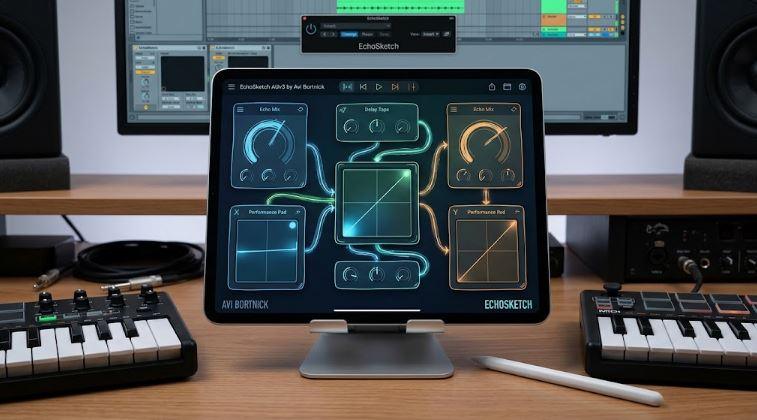
The X/Y pad is EchoSketch’s central idea. Bortnick’s official page says producers can assign any parameter to the X or Y axis, then sweep delay time, feedback, reverb, modulation, and tone with a finger or mouse. Each parameter gets its own independent range, so the pad does not simply move every mapped control from minimum to maximum. It can morph through carefully chosen performance zones.
This turns the plugin into a kind of effects instrument. A producer can push right to increase feedback while pulling down to darken tone. Another setup might move from a dry slapback to a wide ping-pong wash. A vocal throw could move from clean delay into a frozen reverb cloud. A guitar phrase could shift from analog-style drift to reverse texture during the last bar of a section.
The pad also suits touch devices. An iPad screen gives producers a direct surface for gesture-based movement. A mouse on Mac can still control the pad, but the plugin’s concept feels especially natural on iPhone and iPad because the screen becomes the controller.
That is why EchoSketch fits the current iOS music-production moment. It does not only run on mobile devices. It uses their best physical feature: direct touch.
Why Avi Bortnick’s Background Matters
Avi Bortnick is not only a developer building effects from a distance. His official bio identifies him as a guitarist best known for his long musical association with jazz guitarist John Scofield, playing rhythm guitar and electronics, composing, and producing. The bio also notes his work with artists including Jim Weider’s Project Percolator, Erik Deutsch, Forro in the Dark, Ghost Train Orchestra, Jihae, Zigaboo Modeliste, Bobby McFerrin, and others.
That background matters because EchoSketch feels like a player’s effect. Guitarists, dub mixers, live electronic performers, and improvisers often want effects that respond under the hand. They do not want a delay only to sit politely behind the dry signal. They want to push feedback at the edge of runaway, catch a phrase in a freeze, darken a repeat, or throw a chord into space at the right moment.
Bortnick’s rhythm-guitar and electronics background helps explain the design. EchoSketch focuses on timing, touch, and motion. It gives producers a way to play delay and reverb like an extension of the part.
For RobSonic readers, that human-performance angle is the hook. EchoSketch is not trying to be the biggest delay plugin. It tries to make the delay feel alive under the fingers.
How Four Delay Modes Cover Different Performance Jobs
EchoSketch includes four delay modes: Digital, Analog, Reverse, and Ping-Pong. That mode list gives producers several performance identities without making the app feel crowded.
Digital mode follows the clean, patterned character of 1980s rack delays. It suits precise repeats, rhythmic vocal throws, synth echoes, and tempo-locked patterns. Analog mode brings warmer behavior and tape-style pitch glide, which makes it better for drifting guitar, dub chords, and softer repeats. Reverse mode turns time into a transition tool, pushing echoes backward into swells and warped textures. Ping-Pong mode spreads repeats across the stereo field, making it useful for wide synths, drums, vocals, and live electronic movement.
Each delay mode includes controls for delay time, feedback, dry/wet balance, modulation, and related shaping. EchoSketch can sync delay time to host tempo by note value from 1/32 to 1/2, including dotted and triplet options, or producers can dial free milliseconds. This matters because a playable delay still needs timing discipline. A wild gesture can sound exciting, but the track often needs the repeats to land musically.
The strongest use may come from switching mental roles. Digital handles rhythmic clarity. Analog handles warmth and glide. Reverse creates drama. Ping-Pong adds stereo motion. The X/Y pad then lets the producer perform those roles instead of programming them line by line.
Why Delay-Dependent Tone Shaping Matters
EchoSketch’s official page says its feedback uses delay-dependent tone shaping, so short delays stay bright while longer delays darken naturally, similar to classic hardware behavior. That detail matters because delay tone often decides whether an effect feels musical or distracting.
Short delays can support slapback, chorus-like thickening, metallic movement, or rhythmic doubling. If they become too dark, they may disappear. Longer delays often need less brightness because repeated high-frequency content can clutter a mix. Darker long repeats sit behind the source more naturally, especially on vocals, guitars, and synth leads.
EchoSketch builds that relationship into the feedback behavior. Producers still get tilt tone for global darkening or brightening, but the delay itself reacts musically to time. That helps the X/Y pad feel smoother. Sweeping delay time can also change tonal feel, not just repeat spacing.
This makes the plugin useful for performance. A producer can move from short, bright echo gestures into longer, darker trails without manually balancing several EQ controls. The delay responds like an instrument with a tonal memory.
How Parallel Reverb Keeps Repeats Clear
EchoSketch combines delay with true-stereo convolution reverb. The official page lists Spring, Plate, and Hall reverb types, and it notes that the reverb runs alongside the dry signal, tape-echo style, so the space does not wash out the repeats.
That parallel behavior matters. Many delay-and-reverb chains place reverb after delay, which can turn repeats into a blurry cloud. That can sound beautiful, but it also reduces rhythmic definition. EchoSketch’s parallel approach helps preserve the character of the echo while adding space around it.
Spring reverb suits guitars, dub gestures, retro synths, and compact character spaces. Plate reverb can give vocals, leads, and pads a smooth halo. Hall reverb adds larger depth for cinematic throws, ambient tails, and wide transitions. Since the reverb exists beside the delay path, the producer can create space without immediately drowning every repeat.
This is one reason EchoSketch can work on performance material. A live gesture needs clarity. If the repeats disappear into reverb every time the pad moves, the effect becomes less playable. Parallel reverb keeps the time pattern readable.
Why Hold, Lift, Freeze, And Motion Make It Performable
EchoSketch’s performance features give the X/Y pad musical behavior beyond simple dragging. Hold/Lift lets the cursor either stay where the producer drops it or spring back for stutter and momentary gestures. Freeze locks the current wash into an infinite loop so the performer can play over it. Motion records an X/Y pad gesture and loops it hands-free.
These features turn the plugin into a live effects system. Hold works well when the producer wants to land on a new state and leave it there. Lift works well for quick pushes, delay stutters, momentary feedback swells, or reverb throws that snap back after the gesture. Freeze can turn a chord, vocal syllable, guitar harmonic, or drum hit into a sustained bed. Motion can capture a hand movement and repeat it as part of the track.
The Motion feature deserves special attention because it bridges performance and automation. A producer can perform a gesture once, capture its shape, and let the effect repeat that movement. That feels more organic than drawing a perfect ramp in a DAW lane, but it still gives the arrangement a repeatable motion.
For RobSonic readers, this is where EchoSketch becomes useful beyond novelty. It lets producers create effects gestures that sound played, not programmed.
How EchoSketch Fits Guitar, Vocal, Synth, And Drum Workflows
EchoSketch works naturally on guitar because its design comes from a player’s mindset. A guitarist can send a phrase into analog delay, push feedback during a held chord, freeze a wash, or use spring reverb for a familiar amp-like atmosphere. The X/Y pad can behave like a touch-based pedalboard, especially on iPad.
Vocals can benefit from controlled throws. A producer can keep the effect subtle during the verse, then push a single word into reverse delay and hall reverb before a chorus. Ping-pong mode can spread ad-libs or background vocals. Freeze can capture a vowel and turn it into a pad behind the next line.
Synths may get the widest range. A dry pluck can become a rhythmic echo pattern. A pad can gain drifting modulation. A lead can throw notes into reverse movement. A sequence can shift between tight digital repeats and darker analog smear. Drums can use short delays for groove thickening, reverse mode for fills, and ping-pong repeats for breakdowns.
This connects naturally with RobSonic’s guide to creative effects chains, because EchoSketch works well as one stage in a larger production chain. A producer can record EchoSketch passes, resample the strongest gestures, then process them with EQ, distortion, granular effects, sidechain compression, or additional reverb.
Why AUv3 Support Matters For Mobile Producers
EchoSketch runs as an AUv3 plugin or standalone app on iPhone, iPad, and Mac. The official page says it works in AUM, AudioBus, GarageBand, Logic, and other AUv3 hosts, and that a single purchase covers iPad, iPhone, and Mac. It also notes that Mac users should open EchoSketch once after installation to register the Audio Unit in a DAW.
That matters because iOS and iPadOS production depends on host compatibility. A creative effect becomes more useful when it can sit inside AUM, Logic Pro for iPad, GarageBand, or other AUv3 workflows rather than staying locked as a separate app. Standalone mode still helps for live input, demo loops, or quick experiments, but AUv3 support lets EchoSketch become part of a real session.
The App Store listing linked by Synth Anatomy identifies the app as EchoSketch: Performance Delay, with XY pad echo and spring reverb. It requires iOS 17.6 or later for iPhone and iPad, while Mac compatibility requires macOS 14.6 or later and a Mac with Apple M1 chip or later. Those requirements place EchoSketch firmly in the current Apple music-production ecosystem.
For producers who already use iPad effects, the low price and universal purchase make it easy to test. The bigger question is whether the performance concept fits the way they make tracks.
Why Time-Based Effects Are Becoming Instruments
EchoSketch belongs to a larger shift in music software. Producers no longer use effects only to correct, polish, or place sound. They use effects to compose. Delay becomes rhythm. Reverb becomes atmosphere. Freeze becomes a drone. Modulation becomes movement. Gesture recording becomes performance data. An effect can create the hook, not just support it.
This shift fits modern production because many tracks start from processing. A producer may record a simple guitar note, vocal chop, drum hit, or synth stab, then transform it into the main texture. Time-based effects help that transformation because they stretch sound across time. EchoSketch adds the missing piece: hand control.
The X/Y pad makes delay and reverb feel like a playable surface. Freeze turns a moment into a sustain. Motion turns a gesture into a loop. Reverse mode turns repeats into transitions. Ping-Pong mode turns time into stereo movement. Parallel reverb turns echo into space without erasing the rhythm.
That is why EchoSketch feels timely in 2026. It gives producers a compact way to perform the space around a sound.
How Producers Should Use EchoSketch Without Losing The Mix
EchoSketch can create wide, moving, dramatic effects quickly, but time-based processing can also overwhelm a track. Feedback can build too much energy. Reverb can blur the arrangement. Reverse repeats can distract from the vocal. Ping-pong movement can pull focus away from the center. Freeze can create a beautiful bed that fights the next section.
A smart workflow starts with intention. Use EchoSketch as a feature effect on one or two important elements, not as a huge wash on every channel. Place it on a send for shared throws, or insert it on a sound that needs live transformation. Record several gesture passes, then keep the strongest moments instead of leaving every movement running.
A practical first workflow could look like this:
- Put EchoSketch on a vocal chop, guitar phrase, synth stab, or drum loop.
- Map feedback and tone to one axis, then reverb or mix to the other.
- Use Lift mode for momentary throws and Hold mode for longer transitions.
- Capture a Motion gesture when the pad movement fits the groove.
- Print the effect to audio, edit the best bars, and mute the plugin when the arrangement needs space.
This keeps the plugin musical. The point is not constant movement. The point is to make delay and reverb move at moments that matter.
Why EchoSketch Feels Different From Echo Pitch
Bortnick already had an effects-app history before EchoSketch. His earlier Echo Pitch combined multi-tap delay with real-time pitch shifting, and the App Store listing describes it as a pitch-shifting multi-delay for iPhone and iPad with AU support, freeze loop, amp simulation, and reverb. EchoSketch takes a different route. It focuses less on pitch-shifted delay networks and more on playable delay/reverb control.
That distinction matters because EchoSketch feels more like a performance interface than a complex delay matrix. The X/Y pad sits at the center. Parameter assignment, independent ranges, Hold/Lift, Freeze, and Motion shape the identity. The plugin’s delay modes and reverb types give useful sound categories, but the control method defines the experience.
For producers who liked the idea of Echo Pitch but wanted a more direct live-performance effect, EchoSketch may feel easier to place in a session. For guitarists and vocal producers, it may also feel more immediate because it turns effect movement into a hand gesture.
The family resemblance still matters. Bortnick’s apps show a consistent interest in timing, looping, delays, and performance. EchoSketch refines that interest into a cleaner instrument-like effects design.
What Producers Should Watch Before Buying
EchoSketch costs little compared with most desktop effects, but producers should still check whether it fits their workflow. It currently focuses on Apple platforms: iPhone, iPad, and Mac with AUv3 support. Windows, Linux, VST3, AAX, and CLAP users will not get the same direct path unless Bortnick expands the format support later.
The plugin also depends on performance gestures. Producers who prefer conventional knob-based delay design may not need it. Those who enjoy touch control, live processing, iPad workflows, and resampling will understand the appeal more quickly.
Another practical point involves host behavior. AUv3 apps can behave differently across hosts, and Mac users need to open EchoSketch once after installation to register the Audio Unit. Producers should test the plugin in their specific host before relying on it for a live set or deadline session.
The best buyer is someone who wants delay and reverb to respond under the hand. Guitarists, vocal producers, ambient musicians, iPad performers, live electronic artists, and sound designers will likely get the most from it.
Why EchoSketch Makes Delay And Reverb Playable By Hand
Avi Bortnick EchoSketch makes delay and reverb playable by hand because it brings a performer’s control surface to effects that often stay static. The plugin combines Digital, Analog, Reverse, and Ping-Pong delay modes with true-stereo convolution Spring, Plate, and Hall reverb. Host sync, free millisecond timing, delay-dependent tone shaping, analog-style modulation, tilt tone, Hold/Lift behavior, Freeze, Motion gesture recording, standalone operation, and AUv3 support give producers several ways to turn a simple effect into a playable layer.
For RobSonic readers, the practical value is clear. EchoSketch can create vocal throws, guitar swells, synth transitions, drum-loop movement, ambient beds, reverse gestures, dub feedback pushes, and frozen reverb pads without forcing every change into a drawn automation lane. It works because the hand becomes part of the delay and reverb design.
The strongest way to use EchoSketch is to perform it, record it, and edit it. Let the pad move. Capture the gesture. Print the effect. Keep the moments that feel alive. That process turns delay and reverb into something closer to an instrument: not a room behind the sound, but a moving musical object that the producer can shape in real time.