
Folina Audio Groove Destroyer rewrites rhythm without killing the pulse because it does not behave like a normal gate, stutter, or glitch effect. Instead of chopping audio into a rigid pattern, it listens to the groove underneath the source, generates evolving rhythmic events, and reshapes movement while keeping the underlying beat readable. For RobSonic readers who work with drums, loops, synths, guitars, vocals, full mixes, iOS effects, and fast electronic sound design, the plugin matters because it offers rhythmic instability without turning every source into disconnected fragments.
KVR reported on August 23, 2026, that Folina Audio released Groove Destroyer, a rhythmic effect plugin for iOS, Windows, and macOS. The release supports AUv3 for iOS, VST3 for Windows and macOS, and Audio Unit for macOS, with an introductory $2.99 price. Folina Audio’s official Groove Destroyer page describes the tool with the phrase “Rhythmic destruction. Pulse preserved.” That slogan captures the whole creative tension: the plugin wants to damage the groove, but not erase the reason the groove works.
Why Rhythmic Effects Often Break Too Much
Rhythmic effects can become heavy-handed very quickly. A gate can slice audio into predictable on/off shapes. A stutter tool can repeat fragments until the groove turns mechanical. A glitch plugin can generate exciting fills, but it can also destroy the track’s momentum if it ignores the source rhythm. Producers often solve this by printing the effect, editing the best pieces, and muting everything that fights the beat.
That workflow can create great results, but it also slows down production. A producer may spend more time repairing a rhythmic effect than using it. The problem is not chaos itself. The problem is chaos with no sense of pulse.
Groove Destroyer approaches the issue from a different angle. Folina Audio says the plugin continuously reinterprets the rhythm of incoming audio while preserving its underlying pulse. The official page also says a stateful groove engine drives animated filters, accents, timing shifts, stereo movement, and saturation to create patterns that evolve instead of repeat.
That makes the tool interesting. It does not promise clean slicing. It promises controlled rhythmic mutation. The groove can bend, scatter, push, and change shape, but it still needs to feel connected to the music.
How A Stateful Groove Engine Changes The Result
The phrase “stateful groove engine” matters because it suggests that Groove Destroyer does not treat every rhythmic event as an isolated trigger. A simple randomizer might roll a new event without remembering what happened before. A stateful system can create movement that develops across time.
MuseHub’s Groove Destroyer listing explains that the plugin is not a gate, stutter, or glitch effect. Instead, it continuously reinterprets the groove underneath the music so rhythms shift, accents evolve, filters move, and the result feels alive rather than programmed. The listing says the intelligent groove engine generates evolving rhythmic events while preserving the underlying pulse.
That distinction matters in real production. A loop can become more active without losing its original function. A drum break can gain accents and filter motion without turning into a random chopped mess. A synth pattern can pick up movement that follows the track instead of fighting it. A vocal texture can become rhythmic without sounding like it came from a stock trance gate.
For producers, the workflow becomes simpler: place Groove Destroyer on a source, choose how aggressive the reinterpretation should become, then blend it back with the dry signal.
Why “Pulse Preserved” Is The Key Musical Promise
Groove Destroyer’s strongest idea sits inside its own tagline. “Pulse preserved” tells producers that the plugin understands the difference between rhythmic transformation and rhythmic collapse. Many effects can destroy audio. Fewer can destroy just enough.
Pulse matters because listeners need an anchor. A loop can contain broken accents, shifting filters, stereo motion, and saturation, but the body still has to tell the ear where the beat lives. When that anchor disappears, the effect may sound impressive for one bar and exhausting after four.
Groove Destroyer aims to keep that anchor alive. Folina Audio says the plugin reinterprets incoming rhythm while preserving the underlying pulse. KVR repeats the same idea in its August 23 release report, adding that animated filters, accents, timing shifts, stereo movement, and saturation create patterns that evolve instead of simply repeating.
This makes the plugin useful for producers who want rhythmic motion inside an existing groove. It does not require them to rebuild the beat from MIDI, slice the loop manually, or program a new pattern from scratch. The source remains the starting point.
How The Seven Controls Shape The Destruction
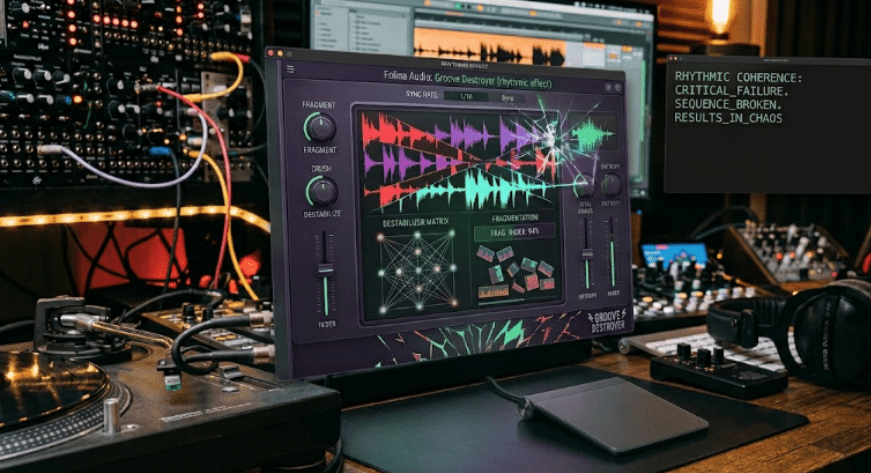
Groove Destroyer uses a focused control set: Destroy, Swing, Density, Scatter, Push, Glue, and Mix. That simplicity matters because rhythmic effects can become confusing when they expose every internal event as a technical parameter. Folina Audio gives producers macro-level control over the musical behavior.
Destroy controls how aggressively the plugin reinterprets the incoming rhythm. Swing shifts the rhythmic feel away from rigid timing and adds groove. Density controls how frequently the groove engine generates rhythmic events. Scatter increases variation and unpredictability. Push drives rhythmic movement and accents forward with greater intensity. Glue adds saturation and cohesion. Mix blends the processed signal with the original.
Those controls form a clear production logic. Destroy decides the overall damage. Swing changes feel. Density decides how busy the reinterpretation becomes. Scatter decides how unpredictable it gets. Push changes urgency. Glue makes the result feel more cohesive. Mix decides how much of the original survives.
This is exactly the kind of interface that can help producers move quickly. Instead of programming a rhythmic processor from scratch, they can shape the balance between stability and mutation.
Why Swing And Density Matter More Than Randomness
A rhythmic effect can sound random in the wrong way when it only adds surprise. Groove needs timing and event spacing. Swing and Density give Groove Destroyer two important ways to control that spacing.
Swing shifts the feel away from rigid timing. That can make processed loops feel less mechanical, especially when the source already has human timing or a loose pocket. On drums, swing can help the effect lean into the groove instead of flattening it. On synths, it can move a straight pattern closer to shuffle or broken-beat territory. On guitars or vocals, it can make rhythmic motion feel less like a grid overlay.
Density controls how often the groove engine creates rhythmic events. Low density can add subtle movement. Medium density can create a busier rhythmic skin. High density can push toward intense mutation. This control matters because too many events can crowd a source quickly.
Scatter then decides how unpredictable those events become. A producer can keep Density active but Scatter moderate, or push Scatter higher for more chaotic movement. That separation makes Groove Destroyer more usable than a one-knob random effect.
How Animated Filters Make Rhythm Feel Tonal
Groove Destroyer does not rewrite rhythm only through timing. MuseHub describes animated dual resonant filters as one of its core features. That matters because filter movement can create rhythm even when the amplitude stays present. A filter sweep can make a loop duck, open, narrow, brighten, darken, bite, or pulse without muting the whole signal.
Animated resonant filters also help rhythmic movement feel tonal. A hi-hat loop can become sharper in selected moments. A synth pad can pulse through filter accents. A drum bus can gain movement in the upper mids while the low end remains more stable. A guitar phrase can pick up rhythmic color that feels closer to wah, envelope movement, or modular filtering than hard chopping.
This makes Groove Destroyer useful on sources that would suffer from heavy gating. A vocal phrase may not need to vanish on every offbeat. A guitar part may not need to turn into a stutter. Filter-driven movement can add rhythmic life while keeping enough of the source intact.
That is why Groove Destroyer’s design feels more musical than the name might suggest. Destruction can happen through tone, not only through cuts.
Why Glue Keeps The Rebuilt Groove Together
The Glue control may become one of Groove Destroyer’s most practical features. Folina Audio defines Glue as saturation and cohesion that pulls the reconstructed groove together. That matters because rhythmic processing can make audio feel fragmented. Timing shifts, accents, filter movement, and stereo movement may create excitement, but they can also make the signal feel like pieces rather than one performance.
Saturation can solve part of that problem. It adds harmonic density, rounds sharp edges, and gives the processed signal a shared texture. Cohesion matters even more when the plugin creates unpredictable rhythmic events. If the groove mutates but the tone stays connected, the result feels intentional.
Glue also helps producers use the plugin on buses and loops. A drum loop with added rhythmic damage may need a little saturation to feel like one loop again. A synth pattern may need harmonic thickness after filtering. A vocal chop may need texture so the processed layer does not sound pasted on.
This connects naturally with RobSonic’s guide to creative effects chains, because saturation often works as the glue between movement, filtering, delay, reverb, and modulation. Groove Destroyer brings some of that chain logic into one focused effect.
How Mix Control Protects The Original Groove
The Mix control gives producers the safest way to use Groove Destroyer. Full-wet rhythmic processing can sound exciting, but the original source often contains the feel that made the loop worth using. A dry/wet blend lets producers add destruction as a layer.
This matters on drums. A dry drum loop can keep the transient structure and groove, while the processed layer adds movement, filter accents, stereo motion, and saturation. On a synth pattern, the dry signal can carry the musical note shape while the wet signal adds rhythmic instability. On vocals, the dry phrase can remain understandable while the processed layer flickers around it.
The Mix control also supports parallel-style processing without extra routing. A producer does not need to duplicate a track, add a bus, or manage latency manually. They can push the effect hard, then pull it back until the groove feels alive but not overwhelmed.
That is why Groove Destroyer may work best as a movement layer. The plugin can rewrite rhythm, but the producer decides how much rewriting the track can survive.
Why It Works On More Than Drum Loops
Groove Destroyer naturally sounds like a drum-loop tool, but Folina Audio and MuseHub both describe broader use cases. MuseHub says producers can use it on drums, percussion, synths, guitars, loops, vocals, or entire mixes whenever they want movement that sounds organic rather than mechanical.
That range matters because rhythmic reinterpretation can help almost any source. A sustained synth can become a pulsing texture. A guitar chord can turn into a moving rhythmic bed. A vocal phrase can become a chopped-but-readable accent layer. A percussion loop can gain shifting filter motion. A full mix can pick up breakdown energy, though that use requires caution.
The plugin’s value increases when producers think beyond obvious stutters. Put Groove Destroyer on a pad and use low Density with moderate Swing for subtle pulse. Place it on a guitar loop and increase Scatter for unpredictable accents. Run a vocal ad-lib through it, blend the wet signal low, and tuck it under the main vocal. Print a full-wet drum pass, chop the best bars, and layer them back under the original beat.
Groove Destroyer becomes most useful when producers treat it as a source generator and arrangement tool, not only an insert effect.
How It Fits iOS, Windows, And macOS Workflows
KVR’s August 23 report lists Groove Destroyer in AUv3 for iOS, VST3 for Windows and macOS, and Audio Unit for macOS. The App Store listing identifies GrooveDestroyer as an iOS app from Folina Audio that requires iOS 12.0 or later. MuseHub lists desktop support for Windows and macOS, with compatibility in major DAWs such as Ableton Live, FL Studio, Logic Pro, and Cubase.
That platform spread matters because rhythmic effects often work best when producers can use them in multiple environments. An iPad musician can use the AUv3 version inside a mobile host. A Windows producer can use the VST3 version in a desktop DAW. A Mac producer can choose VST3 or Audio Unit depending on the host.
The low introductory price also changes the risk. At $2.99 during launch, Groove Destroyer sits in impulse-buy territory, but that does not make the concept disposable. Focused low-cost tools can become regular sound-design staples when they solve one problem quickly.
For RobSonic readers, the key question is not whether Groove Destroyer replaces deeper rhythmic processors. It is whether it can generate fast, musical movement without a long setup process.
Why Folina Audio’s Plugin Line Points Toward Controlled Instability
Folina Audio appears to be building a recognizable identity around small creative effects and instability. KVR’s developer information describes Folina Audio as a Los Angeles-based developer making focused audio tools for creative instability. Recent KVR coverage also lists Folina releases such as EvilTwin, Bit Decay, Gritopia, and now Groove Destroyer. The Folina Grand Opening Collection Bundle describes the company’s first effects as exploring analog warmth, digital destruction, rhythmic instability, and evolving character.
That context helps explain Groove Destroyer. It does not look like a one-off attempt to make a random glitch tool. It fits a wider Folina Audio direction: compact effects built around instability that remains controllable enough for music production.
The timing also matters. Producers in 2026 already have many polished, clean, AI-assisted, and precision-focused tools. A small effect that adds motion, damage, and rhythmic life speaks to the opposite need. Not every track wants clean correction. Some tracks need texture, accident, and movement.
Groove Destroyer fits that need by making instability rhythmic.
How Producers Can Use Groove Destroyer In A Real Session
Groove Destroyer will work best when producers choose a role before turning up every control. A plugin with the word “Destroyer” in its name invites extreme settings, but the strongest track use may come from restraint. Decide whether the source needs subtle motion, breakdown chaos, rhythmic filtering, stereo movement, or saturation glue.
A practical workflow could look like this:
- Start with Mix low so the original groove remains clear.
- Increase Destroy until the rhythm changes enough to matter.
- Use Density to control how busy the generated events become.
- Add Swing when the processed layer feels too stiff.
- Push Scatter only during fills, transitions, or breakdowns.
- Use Glue to make the processed signal feel connected.
- Print the best passes to audio and edit them into the arrangement.
This workflow keeps the plugin musical. It lets producers use Groove Destroyer as a performance effect, resampling tool, or arrangement layer. The source keeps its identity while the processed version adds motion.
For drums, try parallel processing. For synths, use filter movement as pulse. For vocals, blend low and keep intelligibility. For full mixes, automate Mix and Destroy only during transitions so the track does not lose structure.
Why It Can Help Producers Escape Loop Fatigue
Loop fatigue happens when a strong loop becomes boring because it repeats with no meaningful change. Producers often solve that by slicing, duplicating, automating filters, changing velocity, adding fills, reversing bits, muting sections, or layering variations. Those techniques work, but they take time.
Groove Destroyer can accelerate that process. Since its groove engine creates evolving rhythmic events, a loop can change from bar to bar without losing the pulse. The producer can record several passes, choose the most useful moments, and build variation faster than manual editing alone.
That does not mean the plugin should replace arrangement decisions. A track still needs section contrast, space, tension, release, and clear mix placement. Groove Destroyer simply gives producers a faster way to generate rhythmic alternatives from existing material.
This matters especially for electronic genres built around loops. House, techno, breakbeat, ambient, experimental pop, industrial, and trailer-style production all rely on repeated material that needs controlled change. Groove Destroyer gives repeated material a way to mutate without forcing the producer to rebuild it from scratch.
What Producers Should Watch Before Buying
Groove Destroyer looks simple, but producers should check a few practical points. First, MuseHub says desktop download and management happen through the MuseHub desktop client. Producers who prefer direct installers should confirm the purchase and installation path before buying. The iOS version sits on the App Store, while desktop availability appears through Folina Audio and MuseHub.
Second, the plugin specializes in rhythmic mutation. It is not a full step sequencer, drum machine, multi-effect suite, or manual glitch editor. Producers who want exact per-step programming may need a different tool. Groove Destroyer’s strength lies in evolving reinterpretation, not detailed grid editing.
Third, full-mix use requires care. The plugin can process entire mixes, but rhythmic filtering, saturation, stereo movement, and timing shifts can change balance quickly. Producers should reserve that approach for transitions, breakdowns, intros, or sound-design moments unless the track intentionally needs heavy motion across the master.
The best buyer is someone who wants fast rhythmic movement from existing audio, especially when a normal gate or stutter feels too predictable.
Why Groove Destroyer Rewrites Rhythm Without Killing The Pulse
Folina Audio Groove Destroyer rewrites rhythm without killing the pulse because it builds rhythmic mutation around the source’s underlying groove. Its stateful groove engine drives animated filters, accents, timing shifts, stereo movement, saturation, and controlled variation. Destroy, Swing, Density, Scatter, Push, Glue, and Mix give producers direct control over how far the rhythm bends and how much of the original survives.
For RobSonic readers, the practical value is clear. Groove Destroyer can make loops evolve, add movement to static synths, roughen drum parts, create vocal rhythm layers, animate guitars, and generate breakdown textures without forcing every source into a rigid gate pattern. It can sound subtle, unstable, or extreme depending on how the producer balances destruction and dry signal.
The strongest way to use it is to let the pulse guide the damage. Keep the groove readable. Push the movement when the arrangement needs tension. Pull back when the track needs clarity. Print the best accidents. Edit them into the song. That workflow turns Groove Destroyer from a small rhythmic effect into a fast tool for building living motion from audio that might otherwise repeat too neatly.