
Audio-reactive visuals usually listen after the music has been made. A visualizer measures volume, frequency energy, or beat information, then creates animation around the finished sound.
VGTrumpet’s VG Windscape starts earlier in the performance.
The same MIDI information that plays its instrument also paints a live image. Breath controls the movement and intensity of a virtual brush, while notes influence where that brush appears and which colors it uses. The picture is therefore shaped by the performer’s phrasing rather than generated from an audio analysis applied afterward.
VGTrumpet released VG Windscape on October 27, 2026 for Windows and macOS. The official product page currently lists version 1.2, VST, VST3, Audio Unit, and standalone formats, with a $59 standard edition that includes 13 pad and texture sound sets.
Its defining idea is simple: sound and image come from one gesture system.
Windscape Is An Audiovisual Instrument, Not A Visualizer
A conventional visualizer listens to an audio signal and estimates what the music is doing.
Windscape receives the same performance data as the sound engine.
The official VG Windscape page describes the product as an audiovisual instrument rather than a visualizer watching from outside. The picture runs in Google Chrome beside the plugin or standalone instrument and responds directly to MIDI notes, breath data, expression, modulation, or another mapped controller.
That difference affects timing.
The brush does not wait for a waveform analyzer to recognize a loud note. It receives the expressive control data that caused the note to become louder in the first place.
A breath swell can expand the sound and the visual stroke at the same moment.
A note change can move the picture to another position while changing its color.
The image becomes part of the performance event rather than a reaction layered onto it later.
Breath Behaves Like Visual Brush Pressure
Wind-controller players already use breath to shape musical expression.
A stronger breath can increase volume, change timbre, open a filter, or push a sampled instrument into a more forceful articulation. Windscape assigns that same expressive movement to its visual brush.
VGTrumpet says breath intensity can affect stroke width, brightness, and travel distance.
A gentle phrase may produce a smaller, dimmer mark.
A stronger passage can create wider and brighter movement across the screen.
That creates a visual relationship that viewers can understand without knowing anything about MIDI.
The image grows as the phrase grows.
Breath controllers are not the only option. A mod wheel, expression pedal, or another MIDI CC can control the brush. Keyboard players can therefore create similar interactions even without a dedicated wind controller.
The visual system remains centered on expressive data rather than one specific piece of hardware.
Notes Determine Where The Brush Lands
Breath controls how the visual gesture behaves, but notes supply another layer of information.
VGTrumpet maps note data to position and color.
Higher and lower notes can occupy different visual locations, while pitch changes can move the brush through the image. A melody becomes a path rather than a collection of disconnected flashes.
This creates a visual parallel to melodic contour.
An ascending phrase can travel in a different direction from a falling one.
Repeated notes may return to a related area.
Large intervals can create more dramatic jumps.
The result does not function like written notation, and viewers should not expect to read the exact melody from the screen. The mapping gives pitch a visible consequence rather than translating it into a traditional score.
That makes Windscape more suitable for performance imagery than musical analysis.
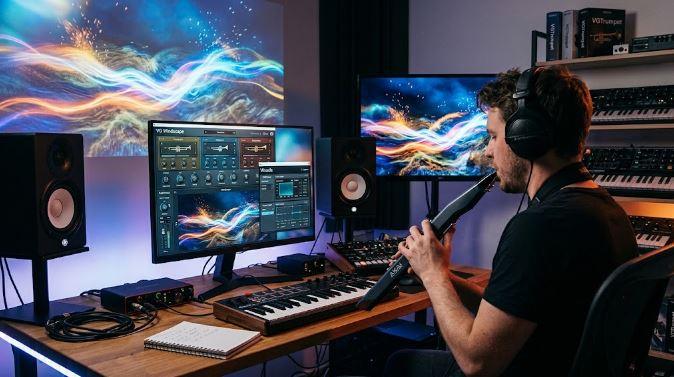
The Same Piece Can Produce A Different Picture Each Time
VGTrumpet emphasizes that Windscape does not run one fixed animation against a clock.
The visual result depends on the actual performance.
Two versions of the same composition can therefore create different images if the performer changes breath pressure, timing, note duration, expression, or another mapped controller.
This gives small musical differences a visual presence.
A longer swell creates a different mark.
A softer entrance changes brightness.
A phrase played with altered timing moves through the visual system differently.
The picture becomes a record of how the piece was performed, not merely which notes appeared in the score.
That quality suits improvisation particularly well. A player can respond to the evolving image, then let that response influence the next musical gesture.
Sound affects picture, and the picture can influence how the performer continues.
Three Sound Layers Support Slow Visual Gestures
The audio side of Windscape is built on the VG Wind Ensemble engine.
It provides three instrument layers, breath and wind-controller handling, keyswitches, portamento, a harmonizer, and a backing-track player. Each layer has separate attack, release, delay, reverb, and controller-assignable freeze behavior.
The included 13 sound sets concentrate on pads and textures with names such as Pad Warm Fog, Pad Silver Rain, Pad Northern Glass, and Pad Black Water.
Pad/Scape mode can extend attack and release times to three seconds. That design works well with the visual system because one breath can create a sustained sound bed and a long brush movement at the same time.
RobSonic’s creative effects chain guide examines how modulation, delay, reverb, and processing order can change the role of a source. Windscape applies a related principle across media: the same gesture shaping the sustained sound can influence the picture that accompanies it.
Freeze Lets A Gesture Continue After The Breath Ends
Each of Windscape’s three layers includes a freeze function that can be assigned to a controller.
Freeze allows part of the sound to continue after the original gesture has ended. A player can hold a sustained texture, then perform another layer above it.
That creates room for the image to develop against a stable sonic background.
A frozen pad might support slow visual painting while another layer carries the active melody. The performer can then release or replace the held material without leaving the instrument.
This workflow is particularly useful for solo performers.
One player can create a background texture, continue performing over it, and generate the accompanying visuals without relying on another musician or a separate video operator.
Photographs Become The Material Of The Brush
Windscape does not paint only with abstract solid colors.
Its brush can draw from photographs.
VGTrumpet includes an image library, and users can point the visual system toward their own folders. Photographs of cities, paintings, natural scenes, textures, or personal images can become the material from which strokes are assembled.
That makes the visual identity customizable.
A live set centered on one location could use photographs from that place.
An artist can work with their own paintings.
A project can use a consistent visual archive across performances and recorded clips.
Creators publishing or projecting the results should use images they own or have permission to use. The software provides the visual mechanism, but the source-image rights still depend on the material placed in the folder.
Scenes Give A Performance A Visual Arrangement
Windscape includes several visual treatments, including frosted glass, image dust, liquid color, kaleidoscopic forms, text, stars, rain-like imagery, and long trails.
These looks can be saved as scenes.
A scene list can move from one visual treatment to another on a timer or in response to a note. Transitions glide rather than switching abruptly.
This gives longer performances a visual structure.
A quiet opening can begin with restrained imagery.
A later section can move into brighter or more fragmented motion.
A note can trigger a change at a musically meaningful point.
The performer does not need to stop playing and operate the visual interface manually every time the presentation changes.
Scenes act like visual sections inside the arrangement.
Running The Picture Separately Protects The Sound Engine
The visual component operates in Chrome beside the instrument rather than inside the audio plugin.
The October 27 VG Windscape release report notes that this separation prevents a visually busy scene from reaching the audio engine.
That architectural choice matters on stage.
Complex imagery can fill a projector or second monitor, while the plugin continues handling sound inside the DAW or standalone application.
The visual controls can be detached into another window and kept on the performer’s laptop instead of appearing in the audience presentation.
Chrome is required for the picture component. The sound instrument itself remains a self-contained plugin or standalone application and does not require Kontakt or another sampler.
One Button Captures Sound And Picture Together
Windscape can record the picture and audio into a video file.
That gives the instrument a role beyond live projection.
A performer can create music clips, social videos, session documentation, or visual releases without reconstructing the image later in video-editing software.
The captured visual belongs to that performance because it was generated from the same breath, notes, and controls used to create the sound.
A second performance may produce another image even when the composition stays the same.
The recording becomes both a musical take and a visual trace of how that take was played.
This is one of Windscape’s strongest practical uses. It converts expressive MIDI data into presentation material during the act of performing rather than adding a separate production stage afterward.
The Visual System Has Clear Boundaries
Windscape does not analyze the final audio waveform.
A distortion effect inserted later in the DAW will not automatically change the brush unless its behavior is connected to MIDI control. The picture responds to notes and controller data, not every timbral detail occurring downstream.
Chrome is required for the visual side.
The system also depends on thoughtful controller mapping. A performance can feel disconnected if visual movement has little relationship to the musician’s expressive choices.
Those boundaries are useful to understand.
Windscape is strongest when the player treats visuals as part of the instrument setup rather than an automatic decoration.
The mapping determines which gestures become visible.
Why Windscape Makes One Performance Control Two Media
VG Windscape’s central achievement is not that it places animation beside a virtual instrument.
Its stronger idea is that sound and image share the same cause.
Breath shapes the tone and moves the brush.
Notes create pitch while setting visual position and color.
Controllers can freeze layers, alter the image, or redirect expressive movement.
Scenes give the picture an arrangement.
Photographs provide visual source material.
Video capture preserves the result.
Use up and down arrow keys to resize the meta box pane.
That creates a different relationship between music and visuals.
The picture is not attached to the performance after it happens.
It is performed at the same time.
Use up and down arrow keys to resize the meta box pane.
Use up and down arrow keys to resize the meta box pane.
For wind-controller players, breath becomes more than a way to articulate sound. It becomes a visible gesture the audience can watch spreading across the screen.