
A piano roll works well when sound design begins with recognizable notes. Place a note on the grid, choose its duration, adjust velocity, and automate pitch bend when the sound needs to move.
Game sound effects often demand a different kind of pitch behavior.
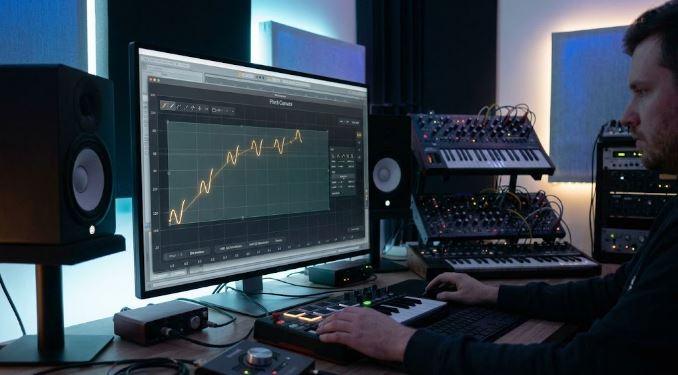
A laser may rise through several octaves in a fraction of a second. A creature call can bend between pitches that do not belong to a scale. A mechanical effect might repeat so quickly that dozens of tiny MIDI notes become difficult to edit. Pontaku Audio’s Pitch Canvas turns those movements into lines that can be drawn directly.
Released in Early Access on October 27, 2026, Pitch Canvas generates MIDI notes, Pitch Bend, and MIDI CC data from curves created on a spectrogram-like surface. The software does not generate audio. It controls synthesizers the producer already uses.
That distinction makes Pitch Canvas less like another synth and more like a visual performance editor for pitch and modulation.
Piano Rolls Describe Notes Better Than Continuous Motion
A conventional piano roll organizes music into discrete blocks.
Each block identifies a pitch, start time, and duration. This structure matches keyboard-based writing because the producer usually knows which note should play and how long it should last.
Sound effects can resist that logic.
An impact may begin high and fall immediately.
A warning tone might accelerate through repeated notes.
A game-engine sound could rise smoothly, break into stepped motion, then collapse downward.
Programming those movements in a piano roll often requires several layers of work: create the notes, draw Pitch Bend automation, match the bend range to the synth, and revise both if the shape does not feel right.
Pontaku Audio’s official Pitch Canvas page begins with the movement itself. Users draw a curve, and the plugin translates that shape into MIDI information.
The visual gesture becomes the starting point rather than the final automation step.
A Frequency Curve Can Describe The Whole Gesture At Once
Drawing a pitch curve changes the way the producer thinks about a sound.
Instead of asking which notes belong in the sequence, the producer can ask where the sound should begin, how quickly it should rise, whether it should wobble, and where it should end.
A straight descending line can become a clean pitch fall.
A curved path can create acceleration or deceleration.
Several tightly grouped movements can suggest rapid repetitions.
Irregular shapes can produce pitch behavior that would feel awkward if divided into conventional scale notes.
Pitch Canvas sends a combination of MIDI notes and Pitch Bend data to create those movements. The connected synthesizer still supplies the oscillator, filter, envelopes, effects, and final timbre.
This separation is useful for game audio.
One drawn curve can drive a bright digital synth for a user-interface effect, then control a distorted bass patch for a mechanical impact. The movement remains similar even though the sonic identity changes completely.
Six Drawing Tools Support Different Kinds Of Motion
Pitch Canvas provides Freehand, Line, Curve, Points, LFO, and Grain tools.
Freehand suits gestures that should feel irregular or performed.
Line creates direct movement between defined positions.
Curve makes acceleration and deceleration easier to shape.
Points provides more structured editing through selected control positions.
LFO adds repeating motion whose waveform, rate, and depth can be adjusted.
Grain offers another way to create dense or fragmented curve behavior.
The important point is that all six tools create control data rather than audio. Even the Grain tool belongs to the visual MIDI workflow; Pitch Canvas is not a granular synthesizer.
Users can reshape an LFO-generated curve after creating it. That prevents the repeating pattern from remaining mathematically perfect.
A producer might begin with a regular oscillation, bend one section, flatten another, and create an effect that starts mechanically before becoming unstable.
Pitch Bend Makes Movement Possible Between Notes
MIDI notes alone cannot describe every curve.
A note message identifies a discrete pitch. Pitch Bend supplies the movement between those pitches.
Pitch Canvas combines the two so a drawn line can travel continuously or in more complicated patterns. The connected instrument must use the same Pitch Bend Range as Pitch Canvas for the result to track correctly.
This setup requirement is small but important.
A curve designed around a 12-semitone bend range will not behave as intended if the receiving synthesizer expects only two semitones. The movement may become compressed or exaggerated.
Once both sides match, the same visual curve can control many compatible instruments.
The plugin is not locked to one synthesis engine, preset library, or sound-design aesthetic. Its value lies in creating the movement that another instrument performs.
Four MIDI CC Lanes Add Timbre To The Pitch Drawing
Pitch rarely changes alone in a convincing sound effect.
A rising engine tone may become brighter as it climbs.
A falling impact might lose high frequencies and volume.
A creature sound could change wavetable position, FM depth, distortion, or resonance while its pitch moves.
Pitch Canvas includes up to four MIDI CC lanes for those relationships.
The producer can draw modulation curves separately from the primary pitch curve, then assign the corresponding CC messages inside the receiving synthesizer.
One lane could control filter cutoff.
Another might change wavetable position.
A third could increase distortion.
The fourth could move reverb or another performance parameter.
This lets the canvas describe a multidimensional gesture rather than pitch alone. The result can behave more like a designed event whose tone develops across its duration.
Live MIDI Makes Drawing An Audition Process
With Live MIDI enabled, Pitch Canvas sends its output directly to a compatible instrument.
The producer can draw a curve, hear the attached synthesizer respond, then revise the movement without exporting anything first.
That short feedback loop matters for sound effects.
A shape that looks convincing may feel too slow once heard. A smooth visual curve might need one abrupt break to give the effect enough impact. Rapid repetitions may require different spacing after the synth’s envelope enters the equation.
Pitch Canvas lets the user audition the relationship between curve and sound while editing.
The connected synth remains part of that judgment. A patch with a long attack responds differently from one with an immediate transient. Portamento, envelope length, modulation response, and Pitch Bend range can all change how the same curve feels.
The canvas provides the instructions, but the instrument determines how those instructions become sound.
Sixty-Four Pages Turn Variations Into Comparable Designs
Sound-effect creation often involves producing several related options.
A game may need multiple laser intensities, impact sizes, interface confirmations, or creature variations. Tiny changes in pitch direction and timing can make those effects feel connected without making them identical.
Pitch Canvas stores as many as 64 pages of curves.
Users can switch between pages to compare alternate pitch and modulation designs without erasing the current version. Curves are saved with the DAW project.
That turns variation into an organized part of the workflow.
One page might contain a short upward sweep.
Another could extend the same gesture.
A third may add LFO movement near the end.
The producer can audition those versions through the same synthesizer, making it easier to judge the curve itself rather than being distracted by changing patches.
MIDI Export Keeps The Result Editable
Pitch Canvas can export notes, Pitch Bend, and MIDI CC as a MIDI file. Generated material can also be dragged directly into the DAW.
This matters because the visual canvas does not become a closed environment.
Once a curve works, the MIDI can enter the normal production timeline. The producer can duplicate it, trim it, move it against picture, edit individual events, or use it to drive another instrument.
The exported data may be more detailed than a simple note clip because Pitch Bend and CC movements form part of the design.
That detail is the point.
Pitch Canvas handles the initial visual translation, while the DAW remains available for precise arrangement and synchronization.
Drawn Sound Design Fits A Wider Move Away From Fixed Grids
RobSonic’s analysis of Danaides 2.1 glitch sequencing examines another tool that reorganizes sound outside a conventional note-writing workflow.
Danaides sequences destructive effects instead of focusing on notes. Pitch Canvas draws pitch and modulation instead of arranging rectangular MIDI events.
Both approaches reflect the same broader idea: a piano roll is useful, but it does not need to be the default interface for every audio task.
Some sound-design decisions make more sense as effect patterns.
Others make more sense as continuous lines.
The interface should follow the behavior the producer wants to create.
Early Access Comes With Practical Limits
The October 27 Pitch Canvas release report identifies the first public Early Access version as v0.9.0. Pontaku Audio currently sells Early Access for $19, with a planned v1.0 price of $29 and a free update to v1.0 for early buyers.
A 14-day trial is available.
Pitch Canvas supports VST3 and CLAP on Windows and macOS. Audio Unit is not supported. Pontaku has tested the plugin in REAPER on Windows and Apple Silicon macOS, but compatibility with other DAWs has not yet been verified.
The host must support routing MIDI output from one plugin to another instrument.
Pitch Canvas uses its own Project BPM and does not automatically follow the DAW tempo. Producers working against picture or tightly synchronized sessions must set that value correctly.
These limitations make the trial especially useful. The concept depends on MIDI routing, Pitch Bend configuration, and host behavior, so buyers should test the complete chain they intend to use.
Why Pitch Canvas Makes Frequency Feel Drawable
Pitch Canvas does not make the piano roll obsolete.
A piano roll remains clearer for chords, melodies, basslines, and other material built from defined notes.
Pontaku Audio is addressing a narrower problem: sound effects whose identity depends on movement that is difficult to describe with note blocks.
A frequency curve can express that movement directly.
The producer sees the rise, fall, oscillation, or repetition as one shape.
Pitch Bend translates the spaces between notes.
MIDI CC lanes connect pitch with timbral change.
Live output turns drawing into an audition process.
Pages preserve variations.
MIDI export moves the finished gesture back into the DAW.
That workflow changes the first question in synthesized sound design.
Instead of asking, “Which notes should I enter?”
Pitch Canvas asks, “What shape should this sound make?”