
Dillon Bastan Iota II turns spectrogram drawing into a new sampling workflow because it treats a sample as an image that can be drawn through, scanned, filtered, resynthesized, and animated. A normal sampler asks the producer to think in start points, loop points, key zones, envelopes, and pitch. Iota II asks a different question: what if the sound’s time and frequency map became the instrument?
Synth Anatomy reported on September 10, 2026, that Dillon Bastan released Iota II, describing it as a visual spectral multi-sampling workstation and a possible spiritual successor to iZotope Iris 2. Audio Plugin Guy’s Stu Smith followed on September 11, 2026, calling Iota II a multi-sampling spectral and granular synthesizer built around a visual spectrogram interface. The official Dillon Bastan Iota II store page lists the product under Plugins / Standalone, confirming that the new version is no longer only a Max for Live device.
For RobSonic readers, the important story is not only that another experimental sampler exists. Iota II points toward a workflow where producers find texture by drawing paths through visible sound rather than chopping waveforms on a timeline.
Why Spectrogram Drawing Changes How Producers Hear A Sample
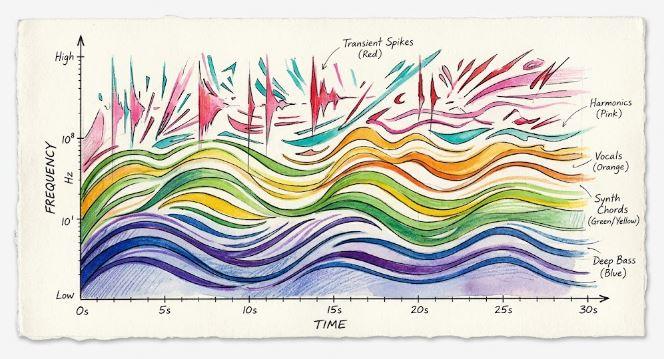
A waveform shows amplitude over time. That is useful for cutting transients, aligning drums, trimming silence, and finding obvious sections. A spectrogram shows time and frequency together. It lets producers see low-end hits, vocal harmonics, cymbal spray, noise bands, resonant streaks, and hidden partials as visual shapes. That changes the way a sample invites editing.
Iota II builds its workflow around that difference. According to Synth Anatomy, the plugin displays imported samples as spectrograms and lets users create playback paths directly across the visual field. Audio Plugin Guy explains the mapping clearly: horizontal position represents sample position, while vertical position corresponds to filtering position. In other words, the producer is not only deciding when the sample plays. They are deciding which frequency areas of the sample become active as the path moves.
That turns sampling into visual excavation. A producer can draw through a vocal breath, then curve upward into its upper harmonics. They can trace the noisy edge of a cymbal rather than trigger the entire hit. They can follow a resonant band inside a field recording and ignore the rest. The sound becomes a landscape, and the path becomes the performance.
This is why Iota II feels different from a standard sampler. It encourages producers to discover the hidden parts of a sample, not only replay the obvious ones.
How Iota II Builds On Dillon Bastan’s Original Iota
Iota II matters more when placed beside the first Iota. Ableton’s official page for Iota by Dillon Bastan describes the original as a Max for Live granular looping instrument for electronic musicians, sound designers, and installation artists. It enabled spectral regions within samples to be windowed, looped, layered, and processed by drawing boxes in a spectrogram. Ableton’s page also says Dillon Bastan is a Los Angeles musician, artist, and programmer.
That first version already had a strong idea: draw rectangles over a spectrogram, and each rectangle defines a loop, window size, and frequency range. The Isotonik Studios Iota page describes it as a Max for Live sample-based granular looper with a spectral waveform UI, individual loop parameters, FFT or biquad filtering, delay, MIDI triggering, and internal automation.
Iota II expands that idea into a broader standalone and plugin workflow. Instead of drawing only rectangular loop boxes, producers can draw free-form playback sequences as 2D points. Instead of working inside Max for Live only, Iota II runs as a plugin and standalone app. Instead of treating each region as a mostly fixed loop, Iota II turns drawn movement through the spectrogram into the core of the instrument.
The result feels less like a sequel and more like a change in sampling grammar.
Why Six Sample Slots Make It A Multi-Source Instrument
Synth Anatomy reports that Iota II includes six sample slots, each capable of loading material from the included factory library or the producer’s own collection. Each imported sample appears as a spectrogram, with gain and tuning controls available per sample. Audio Plugin Guy also notes that each sample has independent gain, tuning, and BPM settings.
That matters because the instrument is not only about transforming one sound. Six sample slots let producers build a small ecosystem of sources. A vocal, field recording, drum loop, synth pad, guitar note, and noise texture can sit inside the same visual workstation. Paths can then pull movement from different materials and combine them into one evolving patch.
This changes how sampling decisions happen. A producer might use one sample for low-end movement, another for bright detail, another for pitched partials, and another for noisy transition material. The patch becomes a collage of visual sound regions rather than a single chopped file.
For RobSonic readers who build ambient beds, game textures, intro soundscapes, experimental hooks, or cinematic transitions, that multi-source design is valuable. It lets the sample library act less like a folder of files and more like a visual palette.
How Twelve Playback Paths Turn Drawing Into Arrangement
The Path system is the center of Iota II. Synth Anatomy says the plugin can create up to 12 different paths, each with its own settings for playback, effects, and playback sequence. Audio Plugin Guy describes those paths as independent systems with playback, effects, physics, triggering, and modulation settings. Within each path, users can create an unlimited number of layers that hold playback sequences drawn on the spectrogram.
That is where Iota II moves beyond simple spectral selection. A path is not just a slice. It is a route through time and frequency. The path can move left to right, right to left, vertically, diagonally, or through more complex curves. Each point represents a playback and filtering position that corresponds to the spectrogram. Layers can have their own length, repeat behavior, modulation, and ordering controls.
This turns sampling into arrangement inside the instrument. A producer can create one path for a slow background texture, another for rhythmic flickers, another for high-frequency shimmer, and another for low-end movement. Those paths can loop, trigger, mutate, and overlap without needing to duplicate tracks across the DAW.
The practical result is speed. Instead of slicing a sample into many clips and building automation lanes around them, the producer can draw the behavior directly onto the sound.
Why Normal, Spectral, And Resynth Playback Matter
Iota II offers multiple playback algorithms. Synth Anatomy lists normal, spectral, and resynthesis algorithms. Audio Plugin Guy says the Spectral option uses a phase vocoder with blur attack and decay parameters, while Resynth is a sine resynthesizer with controls for number and stretch of partials. Playback can operate in Granular / Classic looping mode or Scrub mode, where playback moves between path points without a fixed loop and includes glide-time control.
That range matters because the same drawn path can become several kinds of sound. Normal playback can preserve more sample identity. Spectral playback can smear, filter, and stretch material through the frequency domain. Resynthesis can rebuild the material as partials, pushing it closer to synthetic tone. Granular behavior can chop and cloud the result. Scrub mode can make the path feel like a hand moving through sound rather than a loop repeating in place.
This is why Iota II belongs in the sampling workflow conversation rather than only the granular-synth conversation. It gives producers several ways to interpret the same visual movement. The path is the composition, while the algorithm decides how that composition speaks.
A vocal path can remain vocal-like, become a spectral pad, or turn into a synthetic partial cloud. That choice changes the emotional role of the sample.
How Auto Emit Adds Physics To Sampling
Iota II includes two principal trigger modes. Audio Plugin Guy lists MIDI Note mode, including repitch sampling and pitch-assigned paths, plus Auto Emit mode with interval, delay, skip, variance, single-emission, and path-length-linked triggering controls. Synth Anatomy adds that Auto Emit includes customizable physics gravity attractors with controls such as interval, delay, skip, and variance.
This is one of the most unusual ideas in Iota II. MIDI triggering makes sense for a sampler: play a note, hear the path. Auto Emit suggests a more generative system. Instead of manually triggering every event, the producer can set up movement rules and let the paths emit sound according to timing and physics-style behavior.
That matters because texture often works best when it breathes without sounding fully programmed. A pad may need small spectral sparks. A field recording may need unpredictable partials. A game ambience may need motion that does not loop obviously. Auto Emit can help create those behaviors without forcing the producer to draw every note in a piano roll.
For sound designers, this turns Iota II into a system to tend. The producer chooses samples, paths, layers, attractors, and timing behavior, then lets the patch move.
Why Images As Sequence Sources Fit The Instrument
Synth Anatomy notes that Iota II can drop an image to get a sequence function. That detail fits the instrument’s larger philosophy. Iota II already treats sound as something visible. Allowing images to influence sequence behavior pushes the visual workflow even further.
The value is not that every image will magically create a useful musical result. The value is that visual structure can become performance structure. Lines, contrast, shapes, and density can influence movement. Producers who think visually can bring graphic material into sound design without manually translating every gesture into MIDI.
This is especially relevant for artists working across installation, visual art, game audio, or audiovisual performance. Dillon Bastan’s devices often sit close to that boundary between interface, system, and instrument. The first Iota already attracted electronic musicians, sound designers, and installation artists, according to Ableton’s product copy. Iota II expands that world with more path, physics, and modulation depth.
For RobSonic’s audience, this is a reminder that sampling does not have to stay tied to drum-rack logic. It can become a visual composition process.
How Modulation Makes The Drawing Feel Alive
Iota II includes a deep modulation system. Synth Anatomy lists two multi-wave LFOs with Perlin noise options, two looping envelopes, two path-following sequences, two random spray values, two macros, MPE slide and pressure, and an overall voice amp ADSR envelope. Audio Plugin Guy also highlights modulation, MPE, time-stretching, and multi-effect behavior in its report.
That modulation depth matters because drawn paths can become static if they simply repeat. Modulation lets the patch shift around the path, alter playback behavior, move effects, change parameters, and respond to performance. Random spray values can loosen repeated behavior. Path-following sequences can create motion linked to the drawn line. MPE slide and pressure can make a performer reshape the texture from a compatible controller.
This is where Iota II becomes more expressive than a visual sample editor. The drawing is not the final state. It is the starting map. Modulation then bends, animates, and performs that map over time.
For producers building evolving pads, drones, transitions, and sound beds, this matters. Texture does not only need an interesting source. It needs motion that avoids sounding like a frozen loop.
Why Effects Complete The Texture Workflow
Iota II includes effects that fit the spectrogram workflow. Synth Anatomy lists filtering with three modes: spectral FFT-based, classic biquadratic, and ladder; plus delay, overdrive, sample reduction, and ring modulation. Audio Plugin Guy also describes the plugin as a multi-effect sampler and sound-design instrument.
These are not decorative extras. They help finish the texture inside the instrument. Spectral filtering can keep the processing aligned with the visual-frequency concept. Classic filters can shape tone quickly. Delay can create space and repetition. Overdrive can add density. Sample reduction can push the sound toward digital grit. Ring modulation can create metallic or alien movement.
That makes Iota II useful before the DAW effects chain even begins. A producer can draw the sample behavior, choose a playback algorithm, modulate the path, and shape the result with effects inside one patch. Then the DAW can handle broader production decisions such as bus processing, EQ, reverb placement, and arrangement.
This connects naturally with RobSonic’s creative effects chains guide, because strong sound design often comes from choosing the right order: source, movement, filtering, modulation, distortion, space, and mix placement. Iota II compresses much of that thinking into a visual sampler environment.
Why Iota II Is Not A Bread-And-Butter Sampler
Iota II should not be misunderstood as a replacement for every sampler. If a producer wants to build a realistic piano, organize drum one-shots, map velocity layers, or quickly play a clean multisampled instrument, many conventional samplers will be faster. Iota II is designed for another job.
Its strength is transformation. It is for producers who want to carve a sample into spectral regions, draw non-linear playback paths, create evolving textures, blur timing, resynthesize partials, generate motion, and make ordinary source material feel unfamiliar. Synth Anatomy describes it as an “experimental Photoshop for audio,” which fits because the sample becomes a visual canvas rather than only a playback file.
That makes Iota II especially useful for ambient, drone, experimental electronic music, film textures, game audio layers, transition design, glitch work, and abstract sample-based instruments. It can still create playable patches, but its deepest value appears when the user wants to discover what is hidden inside a sound.
The best way to approach it is not “load sample, play notes.” It is “load sample, investigate the image, draw what the ear might not have found.”
How It Fits The Post-Iris Sampling Gap
The comparison to iZotope Iris 2 appears in several early reports because Iris helped popularize spectral painting as a musical workflow. Synth Anatomy explicitly frames Iota II as a spiritual successor to the long-missing Iris 2, while Digital Mixing’s September 12 coverage similarly describes Iota II as an Iris-style spectral sampler with broad plugin and standalone support.
That comparison is useful, but it should not reduce Iota II to nostalgia. Iris made drawing into sound feel immediate. Iota II pushes the idea toward path-based playback, physics behavior, resynthesis, Auto Emit triggering, MPE control, multi-source operation, and cross-platform plugin support.
The timing also matters. Producers in 2026 have many granular tools, stem tools, AI idea tools, and sample libraries, but fewer instruments that treat the spectrogram itself as the performance space. Iota II fills that gap by making visual sampling feel active again.
For RobSonic readers, the lesson is bigger than one plugin. Spectral sampling remains powerful because it lets producers edit what a sound contains, not only when it plays.
Why Cross-Platform Support Matters
Synth Anatomy reports that Iota II is available for $60 and runs as VST3, AU, and LV2 on macOS, Linux, and Windows, with native Apple Silicon and Intel support on macOS. Audiofanzine also reported that it is available as VST3 and standalone on Windows, AU, VST3, and standalone on macOS, and LV2, VST3, and standalone on Linux.
That platform spread matters because experimental music software often stays trapped in one ecosystem. The original Iota required Ableton Live with Max for Live, as Ableton’s product page notes. Iota II moves beyond that limitation. Producers using Reaper, Bitwig Studio, Ardour, Logic Pro, Ableton Live, or other compatible hosts have a clearer path into the instrument, depending on format support.
Linux support is especially notable in the music-plugin world. LV2 and standalone availability make Iota II more accessible to producers who prefer Linux-based audio setups. Standalone use also matters for sound designers who want to create textures outside a DAW session and export or resample results later.
The practical result is simple: a visual spectral sampler that once lived in Ableton’s Max for Live world now reaches a much wider production audience.
How Producers Can Use Iota II In A Real Session
Iota II will work best when producers start with a source that has internal detail. A plain sine wave may not offer much to excavate. A vocal, field recording, cymbal swell, chord, drum loop, string texture, guitar scrape, noisy synth, or room ambience gives the spectrogram more material to reveal.
A practical workflow could look like this:
- Load one strong source first, then study the spectrogram before drawing paths.
- Draw a slow path through a harmonic region rather than triggering the whole sample.
- Try spectral or resynthesis playback before adding heavy effects.
- Use additional sample slots only when the first path has a clear role.
- Build separate paths for bass movement, midrange texture, and high-frequency detail.
- Add Auto Emit or modulation after the patch already has a useful core.
- Print several passes into audio, then edit the best moments into the arrangement.
This workflow keeps the instrument musical. Iota II can become extremely deep, but producers do not need to use all six samples and 12 paths immediately. One source and one path can already produce a texture that a conventional sampler would not reveal.
The strongest results will likely come from restraint, listening, and resampling.
What Producers Should Watch Before Buying
Iota II looks powerful, but producers should understand its role before buying. It is not the fastest tool for basic drum triggering or realistic multisampling. It is a visual spectral and granular workstation aimed at experimental sampling, texture design, resynthesis, and animated playback. Producers who want instant bread-and-butter sounds may prefer a traditional sampler.
The interface may also require a shift in thinking. Producers comfortable with piano rolls and waveform editing may need time to think in spectrogram space. The vertical axis is not just decoration; it relates to filtering position. The path is not only a loop; it becomes a playback behavior. The same sample can sound completely different depending on path shape, algorithm, trigger mode, modulation, and effects.
The price also places it in a specific lane. At $60, it is not a casual freebie, but it is far below many large commercial sampling workstations. The available trial on Dillon Bastan’s site makes testing important. A producer should know whether drawing through sound fits their workflow before committing.
The best user is someone who enjoys visual sound design, experimental sampling, ambient texture, spectral editing, granular motion, or resynthesis.
Why Iota II Changes The Sampling Workflow
Dillon Bastan Iota II changes the sampling workflow because it moves the producer’s attention from waveform slicing to spectrogram movement. It gives users six sample slots, visible spectral canvases, up to 12 playback paths, free-form 2D sequences, layers, MIDI triggering, Auto Emit behavior, physics-style gravity attractors, normal playback, spectral playback, resynthesis, granular / classic looping, scrub motion, image-derived sequence functions, effects, modulation, MPE support, and cross-platform plugin or standalone use.
For RobSonic readers, the practical value is clear. Iota II can turn a vocal into a moving pad, a drum loop into spectral fragments, a field recording into a playable ambience, a synth chord into resynthesized partials, or a random texture into a structured instrument. It gives producers a way to search inside the sound rather than only around it.
The strongest way to use Iota II is to think visually and listen slowly. Load a source. Look for the hidden shapes. Draw through them. Change the playback algorithm. Let modulation move the path. Use effects to place the texture. Print the result. Then build the track around the parts that feel alive. That workflow turns spectrogram drawing from a technical display into a new way of sampling.