
A sampled wind-chime instrument begins with recordings. Strike several bars, capture the results at different velocities, organize those recordings across a keyboard, and play them back when MIDI notes arrive.
AudioBrain’s ChimeBrain starts somewhere else.
Released in October 2026 by composer and developer Kensuke Okumura’s AudioBrain, ChimeBrain calculates the vibrations of suspended metal bars in real time. Up to 36 bars can have their dimensions, material, and register adjusted, while virtual microphones and a modeled room determine how the resulting vibrations reach the listener.
That means the instrument is not simply choosing which recording should play. It is simulating connected parts of the acoustic situation: the metal objects, how they are struck or moved, where microphones sit, and the room surrounding them.
For sound designers, that distinction changes what can be edited.
Physical Modeling Starts Before A Sample Would Exist
A sample library captures one recorded outcome.
The bar had a specific size. It used one material. A performer struck or moved it in a certain way. The microphone occupied a fixed position, and the room contributed its own reflections.
Once recorded, those properties become baked into the sample.
ChimeBrain instead calculates the behavior of the bars while the instrument is running.
AudioBrain’s official ChimeBrain release describes the software as a real-time physically modeled wind-chime instrument rather than a collection of prerecorded notes.
That makes parameters such as bar geometry more fundamental than ordinary synth controls.
Change the object and the sound changes.
The instrument is effectively recalculating what that new object would do rather than merely filtering an existing recording.
Thirty-Six Bars Can Behave As Separate Objects
ChimeBrain supports as many as 36 independently vibrating metal bars.
That independence matters.
A real wind chime is not one oscillator producing a chord. Each bar has its own dimensions, resonant behavior, decay, and relationship with the other objects around it.
AudioBrain exposes controls for dimensions, material, and pitch register, allowing the collection to be reshaped as an acoustic system.
Longer or differently proportioned bars can behave differently from shorter ones.
Changing material alters the assumptions behind how the virtual object resonates.
Register determines where the resulting collection sits musically.
A sample library might provide several different chime sets to approximate those choices. Physical modeling lets the user alter the model that produces them.
The difference is similar to choosing between photographs of several instruments and having one virtual instrument whose construction can be modified.
The Microphones Are Part Of The Instrument
ChimeBrain does not stop at modeling the vibrating bars.
It includes five virtual microphone families with controls for placement, angle, and stereo spacing.
That moves microphone technique inside the synthesis process.
A close microphone position can emphasize direct detail.
Moving farther away changes the relationship between source and environment.
Stereo spacing can alter how widely the bars occupy the image.
Angle changes how the virtual capture system relates to the modeled objects.
These are not merely post-processing controls labeled “width” or “tone.” They represent part of the recording configuration.
That gives ChimeBrain an unusual workflow.
Instead of generating a finished wind-chime sound and then trying to reshape it with EQ and stereo processing, producers can alter the virtual recording setup itself.
The recording chain becomes editable before it is ever recorded.
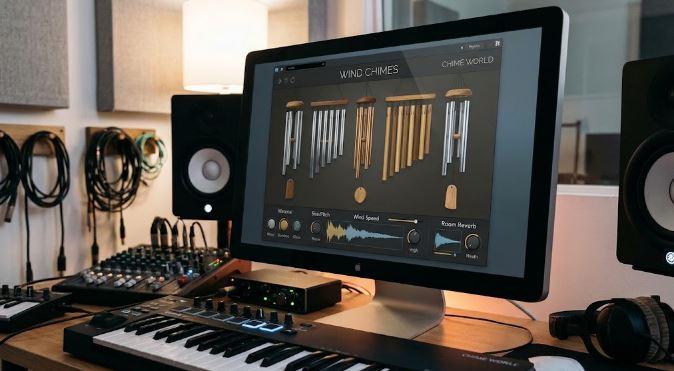
Room Dimensions Extend The Model Beyond The Chimes
AudioBrain also includes an optional modeled room.
Users can alter room dimensions and surface materials, allowing the surrounding acoustic environment to become another component of the instrument.
This creates three connected layers:
the vibrating bars,
the microphones,
and the room.
A change at any one layer can affect the perceived result.
That structure differs significantly from adding a conventional reverb after a sample library.
A typical sampled workflow might play a dry chime recording and send it into an algorithmic reverb.
ChimeBrain is designed around the concept of an acoustic system in which object, capture, and environment can all be adjusted together.
Version 1.0.2 even changed the default behavior so new instruments open with ROOM disabled, reducing CPU demand while keeping the modeled space available when needed. Existing projects retain their previous room settings.
That update shows the computational tradeoff physical modeling introduces: more simulated acoustic behavior requires more processing than simple sample playback.
SHAKE Turns Gesture Into Excitation
Wind chimes are unusual instruments because their identity depends heavily on motion.
They are not normally performed like a piano, where one key corresponds neatly to one note.
Bars collide, overlap, decay independently, and respond to a broader physical gesture.
ChimeBrain addresses this through several performance methods.
MIDI can trigger the instrument conventionally, but users can also interact with individual bars, perform sweeps, or use a SHAKE gesture.
The October 24 ChimeBrain release report highlights those gesture-based controls as a core part of the instrument.
SHAKE is particularly important conceptually.
Rather than telling the software which exact recorded strike should play, the gesture provides energy to the modeled system.
The bars then respond according to their individual physical settings.
That is closer to exciting an object than triggering a sample.
Sweeps Make The Collection Performable As A Group
The Sweep gesture offers another route between strict MIDI notes and completely free motion.
A sweep can move through the bars as a collection, producing a cascading response that resembles the spatial behavior associated with real chimes.
This is useful because wind chimes are rarely interesting only as isolated single notes.
Their character often comes from overlapping decays and the relationship between multiple resonances.
A sweep lets those interactions emerge without programming dozens of independent notes manually.
For cinematic scoring, ambient production, game audio, and installation-style sound design, that makes the modeled object easier to perform as one system.
The result can still be synchronized or edited afterward, but the initial gesture comes from interacting with the whole instrument.
Physical Modeling Avoids Sample-Round-Robin Repetition
Sample libraries often use round robins to reduce obvious repetition.
Record several versions of the same strike and rotate between them so repeated MIDI notes do not always produce an identical waveform.
That works well, but the number of variations remains finite.
A physical model approaches variation differently.
The output is generated from the current state of the model.
Changes in excitation, bar configuration, microphone placement, room settings, and overlapping resonances can all influence the result.
This does not automatically make a physical model “more realistic” than an excellent sample library. A detailed recording can capture physical complexity that is difficult to simulate convincingly.
The advantage is flexibility.
ChimeBrain can respond continuously to parameter changes rather than switching among a predetermined collection of recordings.
For sound design, that can matter more than photographic realism.
The Instrument Deliberately Models Wind Chimes Only
AudioBrain is unusually clear about ChimeBrain’s boundary.
The first edition models wind chimes. It does not include tubular bells, cymbals, or drums.
That limitation is useful because physical modeling becomes less convincing when one algorithm is described as an all-purpose model for every resonant object.
Different instruments involve different physical systems.
A suspended metal bar is not mechanically identical to a stretched membrane or a cymbal.
ChimeBrain’s narrower focus makes its design easier to understand.
The user is modifying one particular family of objects rather than browsing generic “metallic percussion” presets.
That focus also leaves room for future instruments to model other acoustic systems with assumptions appropriate to them.
ChimeBrain Is Currently A Mac-Focused Instrument
Current ChimeBrain releases support macOS with Audio Unit, VST3, and standalone operation.
AudioBrain’s current product listing identifies the instrument as a Universal macOS release, while the initial release coverage focused on Apple Silicon Macs.
The plugin’s $19 regular price also places it closer to an experimental specialist instrument than a large cinematic sample collection.
At launch, AudioBrain offered a temporary introductory discount.
For producers evaluating it after launch, the more important consideration is not library size because there is no conventional sample library to measure in gigabytes.
The question is whether its modeled-object workflow fits the way they want to design metallic acoustic textures.
Physical Modeling Makes Small Changes More Meaningful
One reason physical modeling can be creatively interesting is that parameters often have relationships rather than existing in isolation.
Changing a bar’s dimensions is not simply another way to turn a tone knob.
It changes the virtual object that produces the tone.
Moving a microphone does not merely increase a stereo percentage.
It changes how the modeled source is captured.
Adjusting room materials alters the acoustic environment around those objects.
Those relationships can produce patches that feel less like presets assembled from independent effects.
For producers interested in building sounds from cause and effect, this is a different mindset from loading a recording and processing it afterward.
RobSonic’s guide to creative effects chains examines how signal order can transform relatively simple source sounds. ChimeBrain moves that idea one stage earlier: before an effect chain begins, the producer can redesign the virtual source and recording environment that create the signal in the first place.
Why ChimeBrain Feels More Like A Virtual Object Than A Library
The most interesting thing about ChimeBrain is not simply that it can reproduce wind-chime sounds.
A good sample library can already do that.
Its distinction is where the editable information lives.
A sample library gives the producer recordings.
ChimeBrain gives the producer bars.
Those bars have dimensions and materials.
They vibrate independently.
Gestures excite them.
Virtual microphones listen to them.
A modeled room surrounds them.
Change one part of that system and the instrument calculates a different result.
That is why ChimeBrain feels less like opening a folder of wind-chime recordings and more like placing a virtual acoustic object inside the DAW.
The goal is not to capture one perfect wind chime forever.
It is to let the producer keep changing what the wind chime actually is.