
Numerical Audio MidiRack turns the iPad into a modular MIDI control room because it treats the touchscreen as more than a keyboard, pad grid, or transport remote. It lets producers build a custom performance surface, then connect that surface to a deeper visual MIDI graph where notes, CC data, MPE gestures, sequencers, generators, processors, and instruments can move through patchable signal paths. For RobSonic readers who use iPad music apps, desktop DAWs, AUv3 hosts, MPE instruments, hardware synths, and modular-style sequencing, MidiRack matters because it turns the iPad into a flexible MIDI brain rather than a fixed controller.
Kai Aras of Numerical Audio launched MidiRack as an iPad-focused MIDI toolkit with a base performance surface and an optional MIDI graph unlock. The official page lists launch pricing at $7.99 for the base app and $7.99 for the graph unlock during the introductory window, before both return to $14.99 each. The App Store listing identifies MIDIRack as a Music app from developer Kai Aras, priced at $7.99 with in-app purchases, requiring iPadOS 18.0 or later, and sized at 26.6 MB. Synth Anatomy reported on August 24, 2026, that Numerical Audio MidiRack bridges touch performance and deep MIDI architecture.
That framing explains the product’s real value. MidiRack is not only another iPad keyboard. It gives producers a way to design the controller, design the routing, design the generative behavior, and save the result as a project-specific MIDI environment.
Why The iPad Needed A Deeper MIDI Surface
The iPad has always made sense as a music controller because it offers a large, multi-touch surface, fast layout changes, and direct visual feedback. The problem is that many touch controllers still behave like fixed hardware imitations. They give producers a piano keyboard, drum pads, faders, XY pads, or chord buttons, but the layout often stops there. The producer adapts to the controller instead of reshaping the controller around the track.
MidiRack changes that first step. Its base app lets users build a custom control surface on a snapping grid, using the KB-1 keyboard suite, sequencers, knobs, faders, XY pads, buttons, visualizers, drum pads, chord pads, scale keyboards, and MPE surfaces. The surface can send raw MIDI CC, play notes, drive synths, trigger graph parameters, or act as a performance layer above a more complex patch.
That matters because every production task needs a different interface. A lead pass may need an MPE ribbon. A beat sketch may need drum pads and a step lane. A mix move may need faders mapped to CC. A harmony sketch may need chord pads and a scale keyboard. A generative patch may need knobs, probability lanes, and visualizers. MidiRack lets the iPad become whichever surface the session needs.
For RobSonic readers, that flexibility is the key point. A touch controller becomes more powerful when producers can redesign it per track.
How MidiRack Builds On KB-1 Without Replacing It
Kai Aras already had a strong iPad performance tool in KB-1 Keyboard Suite. Synth Anatomy notes that KB-1 offered eight distinct performance layouts for iPad and iPhone, but its adaptability stayed limited to certain parameters. MidiRack moves beyond that approach by bringing every KB-1 keyboard into a new modular environment.
The official MidiRack page says every KB-1 keyboard lives inside MidiRack: piano, chord pads, scale keyboard, MPE Seaboard, MPE Strings, and drum pads. Users can mix, resize, and arrange those controls on one surface beside sequencer lanes and controller modules. KB-1 continues as its own app, but MidiRack becomes the deeper successor for producers who want to build full control surfaces rather than pick from prepared layouts.
This matters because many musicians already know the value of touch keyboards. Chord pads help sketch progressions. Scale keyboards reduce wrong-note anxiety during live performance. MPE surfaces give fingers pitch, slide, and pressure control without dedicated hardware. Drum pads make beat entry immediate. MidiRack keeps those familiar controls but makes each one a routable node in a larger system.
The result is a meaningful upgrade path. Producers do not lose the fast-playability of KB-1-style controls. They gain a modular MIDI architecture underneath them.
Why The MIDI Graph Makes The App Feel Modular
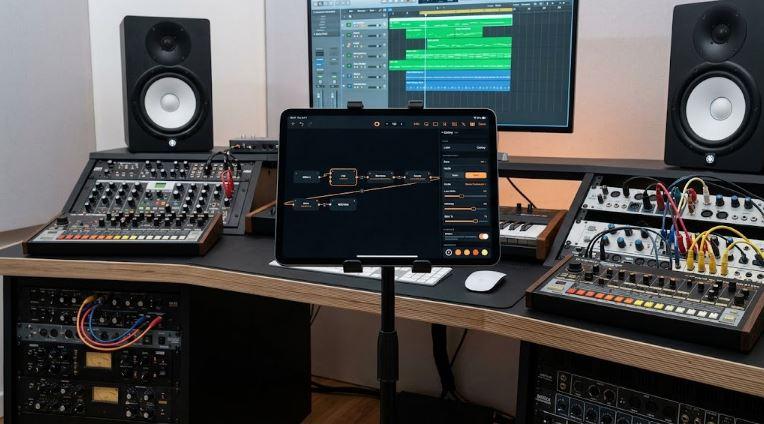
The MIDI graph is the feature that makes MidiRack feel like a control room. Numerical Audio’s official page describes a visual canvas where users wire MIDI In through processors to MIDI Out, with orange wires carrying MIDI and amber wires carrying modulation. The graph supports branching, merging, per-node bypass, color tags, group frames, inline parameter editing, and activity LEDs that show MIDI flow in real time.
That language should sound familiar to modular users. A Eurorack patch routes voltage through modules. A DAW modular environment routes signals through devices. MidiRack routes MIDI through nodes. The difference is that the material is note data, controller data, timing, probability, scale, humanization, chords, arpeggiation, MPE, and generative movement.
The MidiRack manual describes the app as a visual workbench for building MIDI processors and performance surfaces by hand, with no coding required. In practical terms, a user can wire a keyboard into a chord node, then into an arpeggiator, then into a quantizer, then into a MIDI Out node. Another branch might send a drum sequencer through humanization, swing, and probability before reaching a drum app. A third branch might use an LFO or generative node to modulate a parameter.
That is why “control room” fits. MidiRack does not only trigger notes. It routes, transforms, generates, visualizes, and controls MIDI as a complete performance system.
How 60+ Nodes Change The Producer Workflow
MidiRack’s graph unlock includes more than 60 node types, according to the official page and App Store listing. Those nodes include arpeggiators, scale and key quantizers, transposers, chord tools, echoes, swing, humanize, Euclidean rhythms, random and generative melodies, LFOs, CC tools, analog-style sequencers, a Matrix sequencer, counters, built-in instruments, and emergence generators.
That range matters because MIDI workflow usually gets split across several tools. One plugin handles arpeggiation. Another handles probability. Another handles chord generation. Another handles MIDI echo. Another handles routing. Another handles CC modulation. MidiRack brings many of those ideas into one patchable environment.
The practical advantage comes from chaining. A producer can place a scale quantizer after a random melody generator. They can add swing after a sequencer. They can send one chord pad into an arpeggiator and another into a pad synth. They can split keyboard zones, route them to different MIDI channels, and keep MPE data intact when needed. They can bind surface controls to node parameters and perform the graph without opening the patch view.
This is different from a static controller app. MidiRack lets the producer build the MIDI logic, then design the playable surface around that logic.
Why MPE Makes The iPad Feel Like Expressive Hardware
MidiRack’s MPE support gives it a strong reason to exist beyond normal control surfaces. The official page says the app includes two expressive MPE surfaces with per-note pitch bend, slide, and pressure. The manual describes the MPE Seaboard as a continuous ribbon surface with horizontal glide, vertical slide through CC 74, and pressure, routed to MPE-capable synths on per-note channels. It also describes MPE Strings as a LinnStrument-style grid tuned in fourths, with the same per-note expression.
That makes the iPad feel more like expressive hardware. A producer can play a lead line with finger slides, pressure swells, and per-note pitch movement. A chord can hold several notes while one finger bends independently. A grid layout can support string-like fourths movement. A DAW instrument that supports MPE can receive the gestures over MIDI.
Dedicated MPE controllers can cost far more than an app, and they keep one physical layout. MidiRack’s advantage lies in flexibility. The same iPad surface can become an MPE ribbon for a synth solo, a grid for expressive chords, a drum-pad layout for beats, a fader bank for automation, and a sequencer page for arrangement ideas.
This does not make a glass screen identical to dedicated hardware. It does make the iPad a serious expressive controller for producers who already own one.
How Sequencers Turn MidiRack Into A Pattern Box
MidiRack’s sequencer suite gives the app more depth than a controller-only tool. The App Store listing describes drum, melody, chord, analog, and CC step grids, plus a Matrix note grid. It also lists moving playheads, swing, microtiming, per-step velocity, probability, ties, trigger conditions, pattern chaining, and four-pad scene switching.
The manual expands that idea with Lane+ controls. A single 16-step row can include pattern, velocity, probability, tie, and condition layers. A step can fire every time, only on selected passes, or at a set probability. Pattern banks A, B, C, and D let producers build variations, while scene pads can switch multiple lanes together on the downbeat.
This is why MidiRack can feel like a modular pattern box beside the DAW timeline. It can create a drum groove, bassline, chord progression, CC movement, and generative variation without forcing the user to draw everything in a piano roll. Producers can keep the DAW running while the iPad handles live pattern changes.
For RobSonic readers, this workflow matters because it sits between improvisation and arrangement. A producer can jam with patterns, record the MIDI output, capture the best pass, then edit inside the DAW.
Why Generative Nodes Make It More Than A Utility App
MidiRack includes “emergence” generators that push it beyond conventional MIDI processing. The App Store listing names Conway’s Game of Life, Turing machine, Wolfram rules, Markov, bouncing balls, and Lorenz attractor. The manual describes emergence nodes as evolving patterns with live surface visualizers, where users can draw a Life seed, scan it into melody, switch Markov from Listen to Generate, or wire Attractor X/Y/Z outputs into any parameter.
Those features matter because generative MIDI often struggles with usability. Random notes can become chaos quickly. Useful generative tools need scale control, routing, probability, resets, visual feedback, and performance controls. MidiRack places those generators inside a graph where quantizers, counters, arpeggiators, mutes, switches, and surface knobs can shape their output.
A producer might use a Turing node for a bassline that changes slowly, a Markov node for melodic variation, a Life grid for pad movement, or a Lorenz attractor for parameter modulation. The result can drive external synths, AUv3 instruments, or built-in sounds.
That gives MidiRack a creative identity. It can become a self-playing composer, but it also lets the producer constrain and perform that system.
How Built-In Instruments Help Producers Test Ideas Fast
MidiRack primarily works as a MIDI processor, not a full synth workstation. Numerical Audio makes that clear in the official FAQ. Still, the standalone app includes a built-in polyphonic synth and GM-style drum kit, while the graph includes Synth, Drums, Sampler, and Slicer nodes. The manual says producers can hear patches immediately through built-in sound, then route MIDI to external synths or other apps when needed.
That design choice solves a real workflow problem. MIDI graphs can feel abstract when they make no sound until another app or synth receives the output. Built-in instruments let users test whether the patch works before building a full routing setup. A generative melody can play through the internal synth. A drum pattern can trigger the GM-style kit. A sampler or slicer node can produce sound directly inside the graph.
The built-in sound does not need to replace a favorite AUv3 synth, desktop instrument, or hardware module. It acts as a quick audition layer. Once the pattern, routing, or controller surface works, the producer can send MIDI to a better sound source.
This helps MidiRack feel practical. The user can start in seconds, then connect deeper tools when the idea deserves it.
Why DAW And Hardware Integration Matters
MidiRack becomes most useful when it connects to the rest of the studio. Numerical Audio’s official page describes a simple desktop workflow: iPad to Mac over USB through IDAM, or wirelessly over Bluetooth MIDI. The app then appears as a MIDI source without a helper app or driver. The App Store listing also highlights MIDI output to desktop DAWs such as Logic, Live, Bitwig, and Cubase, plus any CoreMIDI destination.
The AUv3 side matters for iPad producers. The official FAQ says MidiRack runs as an AUv3 MIDI-processor plugin in hosts such as AUM, Logic Pro, GarageBand, Cubasis, Drambo, and Loopy Pro. Tempo-synced nodes follow the host transport, while the MIDI Out node can route all 16 channels and MPE.
That makes MidiRack useful in several setups. A desktop producer can use the iPad as a custom control surface and sequencer. An iPad-only producer can place MidiRack inside AUM or Logic Pro for iPad and route it to instruments. A hardware user can send MIDI over CoreMIDI or a connected interface. A live performer can save project-specific surfaces and patches.
This connects naturally with RobSonic’s guide to creative effects chains, because MIDI control often decides how effects become playable. A MidiRack surface can move delay feedback, filter cutoff, reverb mix, granular parameters, or synth macros while the graph generates notes and rhythm.
Why No-Code MIDI Design Matters
MidiRack’s no-code approach matters because many producers want modular logic without scripting. Max, Pure Data, SuperCollider, Lua-based tools, and custom MIDI scripts can do powerful things, but they ask users to think like programmers. MidiRack asks users to patch by hand: add a node, connect it, inspect parameters, bind controls, save a preset, and play.
The manual’s “Build your first patch” example shows that flow. A user opens a preset, views the signal flow, adds an arpeggiator between MIDI In and the next node, adds a knob to the surface, binds that knob to the arpeggiator rate or gate, exits edit mode, and performs the result. That is the learning curve MidiRack wants: visual, practical, and immediate.
This matters for producers who understand music deeply but do not want to write scripts. A drummer may think in probability, accents, and scene changes. A keyboardist may think in chord pads and MPE expression. A modular user may think in branches and modulation. MidiRack gives each of those users a visual MIDI vocabulary.
No-code does not mean shallow. It means the tool makes complexity approachable.
Why Surface-To-Graph Binding Is The Secret Feature
The most important MidiRack idea may be the connection between surface controls and graph parameters. A controller surface becomes powerful only when it controls the right things. In MidiRack, knobs, faders, XY pads, buttons, keyboards, lanes, visualizers, and graph nodes can connect through bindings.
A knob can adjust arpeggiator rate. A button can bypass a node. An XY pad can move two parameters. A scene pad can switch pattern banks. A keyboard can route to a specific output channel or MPE connector. A visualizer can show note or CC activity. The surface becomes a readable front panel for a deeper patch.
This solves a problem that affects many modular environments. The patch may work, but performing it can feel messy if the user has to open the graph every time. MidiRack lets users build the “instrument panel” after they build the logic. The graph can stay complex while the surface stays playable.
For RobSonic readers, that is the difference between experimentation and performance. A patch becomes useful when a producer can operate it under pressure.
How Producers Can Use MidiRack In A Real Session
MidiRack can support several real production workflows. A beatmaker might build a drum-pad surface with step lanes, probability, swing, and scene pads, then send the output to a drum app or DAW track. An ambient producer might build an MPE surface, a chord pad bank, a generative melody branch, and several faders that control synth parameters. A techno producer might use analog-style sequencers, pattern banks, Euclidean nodes, and mute buttons for live arrangement. A composer might use chord pads, scale keyboards, and MIDI routing to sketch harmony quickly.
A practical first workflow could look like this:
- Build a surface with one scale keyboard, one chord-pad row, one MPE ribbon, and four faders.
- Route each control independently through the graph to different MIDI channels or an MPE output.
- Add a quantizer, arpeggiator, or chord processor only where the part needs help.
- Use sequencer lanes for drums, bass, or CC movement.
- Save the surface and graph as a project-specific patch before recording the MIDI output.
This keeps MidiRack focused. The app can become huge, but the best patches start with a musical need: play a lead, sketch chords, generate a bassline, control effects, or run a groovebox.
What Producers Should Watch Before Buying
MidiRack looks powerful, but producers should understand the pricing and platform limits before jumping in. The base app offers the performance surface, KB-1 keyboards, sequencers, knobs, faders, MPE, built-in sounds, and MIDI routing. The deeper visual MIDI graph requires a separate in-app purchase. During the launch window, the base app and graph unlock cost $7.99 each, according to Numerical Audio and the App Store, then move to $14.99 each.
The official site presents MidiRack as built for iPad, with iPadOS 18 or later required. The product page says iPhone and Mac Apple silicon versions will come later as the same app and AUv3, while the App Store page currently focuses on iPad compatibility and also lists Apple Vision compatibility through visionOS 2.0 or later. Producers should check the App Store listing before purchase if they plan to use it outside an iPad workflow.
Users should also remember that MidiRack creates, transforms, and routes MIDI. It can make sound through built-in instruments, but its biggest value comes from controlling other instruments, apps, DAWs, or hardware. Anyone expecting a traditional synth app may miss the point. Anyone looking for a custom MIDI brain will understand it quickly.
The best buyer is a producer who wants to design the controller and the MIDI logic, not only play a fixed onscreen keyboard.
Why MidiRack Makes The iPad Feel Like A Modular MIDI Control Room
Numerical Audio MidiRack makes the iPad feel like a modular MIDI control room because it combines a customizable touch surface with a patchable MIDI graph. The app gives producers KB-1 keyboards, MPE surfaces, chord pads, scale keyboards, drum pads, sequencers, knobs, faders, XY pads, buttons, visualizers, 60+ graph nodes, built-in instruments, generative systems, MIDI routing, AUv3 operation, CoreMIDI output, IDAM desktop connection, Bluetooth MIDI, and project-specific layouts.
That combination matters in 2026 because iPad production has moved beyond novelty. Producers use tablets to sketch, perform, control desktop DAWs, host AUv3 instruments, sequence hardware, and build live sets. MidiRack fits that world because it does not force one workflow. It lets the iPad become a controller, sequencer, generative composer, MIDI processor, groovebox, MPE surface, or DAW companion.
For RobSonic readers, the practical lesson is clear. MIDI control shapes how music gets performed, not only how notes get entered. A custom surface can make a synth more expressive. A graph can make a sequence more alive. MPE can make touch performance more detailed. Generative nodes can create movement without abandoning musical control. MidiRack brings those ideas together and turns the iPad into a MIDI room that producers can rebuild for every track.