
Beat-reactive visualizers usually begin with pulse. A kick arrives, a shape expands, colors flash, and the animation waits for the next transient. AcusMagic Figura uses a different relationship between sound and image. It measures frequency content, sends that information into simulated physical systems, and draws the resulting behavior in real time.
AcusMagic founder Paolo Zappalà released Figura on October 26, 2026 for macOS and Windows. The software runs as an audio plugin or standalone application and provides three views: sand forming Chladni figures, liquid developing Faraday-wave patterns, and stereo audio traced as a three-dimensional Lissajous curve.
The distinction matters. Figura does not ask only whether a beat happened or how loud it was. Its visuals depend on which frequencies are present, how those frequencies relate to the modeled object’s resonances, and how the producer changes the virtual material.
That makes cymatics part of live visual performance rather than decoration attached to the beat.
Beat-Reactive Visualizers Start With The Pulse
Many music visualizers rely on amplitude, frequency bands, or onset detection.
A strong kick can enlarge an object. A snare can trigger a flash. Treble energy may brighten one region of the screen. Those relationships are effective for creating immediate synchronization between music and image.
Their behavior can still remain fairly direct.
Louder often means larger.
A transient triggers an event.
A frequency band controls a color or shape.
Figura works from a more physical premise. The official Figura page explains that Sand and Liquid modes measure as many as 32 prominent partials in the incoming audio and use them to drive simulated matter.
The image depends on how that matter responds.
A loud note does not guarantee a clear figure. A quieter note near one of the model’s resonant frequencies may produce a much more organized pattern.
Sand Mode Lets Resonance Decide What Appears
Figura’s Sand mode draws Chladni-style patterns on a vibrating surface.
In a physical Chladni experiment, sand moves away from strongly vibrating areas and gathers along nodal lines where the plate remains relatively still. The resulting geometry reflects the vibration modes of the plate.
Figura simulates that process.
The strongest partials in the audio excite modes in the virtual surface. Sand then settles around the nodal structure created by those modes.
A tone near one of the plate’s resonances can produce a stable, recognizable figure. A tone sitting between useful resonances may leave the grains moving without organizing them into the same kind of pattern.
That response is different from a visual preset assigned to a particular note.
The figure emerges from the relationship between the incoming frequency and the modeled object.
The Same Note Can Draw A Different Figure
A frequency does not contain one universal cymatic image.
Change the surface and the response changes.
Figura’s Studio model provides Size and Tension controls that move the virtual resonances toward or away from the source audio. The Lab model exposes physical parameters in real units, including size, thickness, density, elasticity, Poisson’s ratio, and sand weight.
Plate shapes include circle, square, rectangle, hexagon, and triangle.
That means one sustained note can produce different geometry after the plate material or dimensions change.
The visual is not a hidden symbol stored inside the note.
It is the result of a note interacting with a physical model.
This makes the material settings performable. A producer can hold one sound steady, automate the plate, and watch the figure move through different resonant conditions.
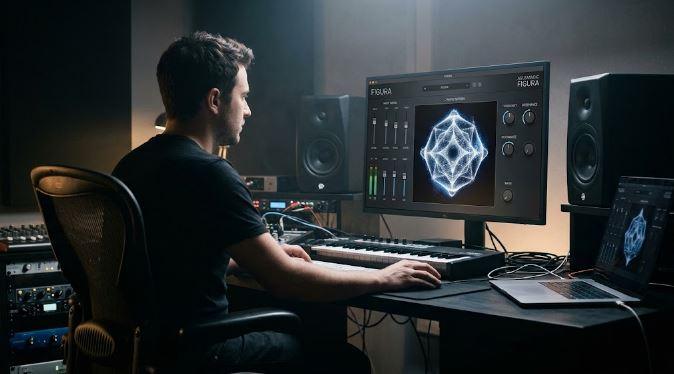
Figura Reads Partial Structure Rather Than Musical Meaning
Figura does not need to know whether the source is a vocal, synthesizer, drum loop, guitar, or finished mix.
It listens to frequency content.
The current model examines roughly 170 to 190 milliseconds of recent audio, identifies as many as 32 partials between 20 Hz and 12 kHz, and uses them to drive the visual simulation. The default rig can draw as many as 24 modes.
Two frequencies separated by less than roughly 20 Hz may merge during analysis.
These boundaries make the visual process easier to interpret.
Figura is not performing semantic analysis and deciding that a guitar deserves one image while a voice deserves another. Different sources create different pictures because their partials, stereo relationships, and changes through time differ.
Processing the source changes the visual input too.
RobSonic’s creative effects chain guide explains how filtering, distortion, delay, and reverb can change the identity of a sound. Place Figura after such a chain and those spectral changes become new material for the simulated plate or liquid.
Liquid Mode Turns Frequency Into Faraday Waves
Figura’s Liquid view uses another physical model.
Incoming frequencies drive the surface of a virtual liquid, producing Faraday-style waves with rendered caustics and reflections.
The liquid responds at half the driving frequency. Viscosity, depth, vessel size, surface tension, density, and refraction influence the result.
Different settings favor different structures.
Lower viscosity can produce square-like grids.
Higher viscosity can encourage stripe patterns.
Shallow liquid at low frequencies may create hexagonal forms.
Bass and kick material can shape the liquid with relatively little energy, making this mode particularly responsive to low-frequency sources.
The image may still pulse with rhythm, but rhythm is not the only cause. The evolving lattice depends on frequency, damping, depth, and simulated liquid behavior.
Lissajous Mode Makes Stereo Relationships Visible
Figura’s third view does not model sand or liquid.
Lissajous mode draws the stereo signal itself as a curve.
Left-channel amplitude becomes one axis and right-channel amplitude becomes another. A mono signal produces a diagonal relationship in standard left/right mode, while wider or phase-shifted material opens into more complex geometry.
Mid/Side operation provides another perspective.
Phase L and Phase R can rotate channel phase for the drawing, allowing a mono sine wave to become a circle when one side is shifted by 90 degrees. Richer sources produce more elaborate loops.
The user can orbit the curve in three dimensions, adjust its thickness, color, glow, and trail, then automate those visual properties in the host.
This mode turns stereo width and phase into visible motion without pretending to simulate a physical plate.
Figura Leaves The Sound Alone By Default
Visual software inserted on an audio channel can create a reasonable concern: does the image processing alter the mix?
Figura is designed to pass the audio through unchanged at its default Output and Mix settings.
Controls for matter, lighting, grain appearance, plate construction, and visual phase affect the image rather than the sound. The plugin can therefore sit on a synth, stem, bus, or master channel without functioning as an audible effect.
This one-way relationship is central to its purpose.
The audio drives the picture.
The picture does not reshape the audio unless the user changes the limited output controls intended for that purpose.
Figura can therefore remain active during mixing, performance, or recording without forcing the producer to build a separate audio route purely for visualization.
Ninety-Three Automatable Parameters Make The Image Performable
Figura provides 93 host-automatable parameters.
That makes the physical model part of the arrangement.
A plate can change shape during a transition.
Tension can rise with the music.
Liquid viscosity can move from a square lattice toward stripes.
Lissajous trails can lengthen during an ambient section.
Color, grain style, lighting, exposure, phase, and viewing parameters can change through DAW automation.
The source audio remains one performer.
The automated physical and visual settings become another.
This is where Figura moves closest to being a live visual instrument. The producer is no longer watching one fixed simulation respond passively. They can perform the simulated matter and visual presentation around the music.
Projection Turns The Plugin Into A Stage Tool
Figura comes in Studio and Live editions.
The October 26 Figura release report confirms that Figura Live adds a dedicated window for external displays and projectors.
The projection continues running when the main editor closes. Its GPU renderer uses the external display’s refresh rate, allowing the producer to keep the plugin interface separate from what the audience sees.
Figura Studio costs €59.
Figura Live costs €75.
Both editions include Sand, Liquid, Lissajous, still-image capture, video export, plugin formats, and the standalone application. Live adds the projection window.
The standalone version can draw from an audio interface or microphone without requiring a DAW, which makes Figura usable for concerts, installations, rehearsals, and gallery presentations.
Export Makes Each Performance Reusable
Figura can save square PNG images at 1024, 2048, or 4096 pixels.
Its recorder captures the audio leaving the plugin and the visual performance, then renders an H.264 MP4 with AAC audio. Export options include 2K or 4K resolution at 30 or 60 frames per second.
Rendering takes place in the background after the performance stops.
Saved takes can be exported again at another size later, which separates performance capture from final delivery settings.
This gives Figura a practical role in content production.
A producer can generate album visuals, music clips, projection assets, social videos, or artwork from the same audio used in the track. Since the physical settings and source performance both affect the result, each take can create a different image.
The Physics Model Has Useful Limits
Figura is a real-time model, not a laboratory replacement.
Its analysis window, partial limit, frequency range, and modal count place boundaries around what can be displayed. Closely spaced frequencies may merge, and rendering layers such as lighting, shading, reflections, and caustics sit above the physical field.
The Sand view does not prove that one piece of music possesses one objective geometric form.
The image depends on the chosen plate.
Liquid behavior depends on the selected material parameters.
Lissajous geometry depends on the stereo signal and viewing configuration.
Those limits strengthen the creative concept. Figura does not present visualization as mystical certainty. It gives producers a declared model whose rules can be altered, automated, and performed.
Why Figura Feels Like A Live Visual Instrument
Figura does more than make shapes move to music.
It measures partials.
Those partials excite simulated matter.
The matter responds according to resonant modes, dimensions, tension, density, viscosity, depth, and other defined properties.
Sand gathers where a virtual plate stands still.
Liquid develops frequency-driven wave structures.
Stereo audio becomes a three-dimensional curve.
Automation changes the visual system during the arrangement.
Projection places the result on stage.
Recording turns the performance into reusable video.
The beat can influence the image, but it does not control the entire visual relationship.
Figura gives frequencies, material, stereo structure, and simulated physics equal roles.
That is why it behaves less like an animation waiting for the next kick and more like an instrument whose medium happens to be visible matter.