
Yurt Rock Pick Pocket lets producers steal a drum groove’s human pocket because it focuses on the part of a drum performance that normal audio-to-MIDI tools often flatten: the feel. A kick on the grid, a snare behind the beat, a hi-hat pushing slightly ahead, and a ghost note tucked below the main groove can all matter as much as the drum sounds themselves. Pick Pocket is built around that idea. It extracts timing and velocity from a drum recording, keeps the groove unquantized, and turns the performance into editable MIDI that can drive the producer’s own drum sounds.
Yurt Rock’s official Pick Pocket product page describes the plugin as an audio-to-MIDI drum tool that can capture audio from a DAW track, detect clean 2-, 4-, or 8-bar loops, classify hits as kick, snare, or hi-hat, measure swing, push/drag, and tightness, and export the result as standard MIDI, Ableton .agr groove files, or rendered WAV. KVR listed the release on August 31, 2026, noting that Yurt Rock launched Pick Pocket as a $49 macOS and Windows plugin, standalone app, and browser-capable tool for converting drum recordings into editable, unquantized MIDI. Sonic State covered it on September 7, 2026, under the phrase “Steal The Pocket From Any Drum Groove”, which captures the product’s provocative hook.
For RobSonic readers, the important story is not only audio-to-MIDI conversion. The deeper shift is that producers can separate groove feel from drum tone without forcing the performance onto a rigid grid.
Why The Pocket Matters More Than The Notes
A drum groove rarely works because the hits sit perfectly on the grid. The pocket lives in tiny timing differences: a snare that leans back, a kick that arrives a little early, a hi-hat pattern that breathes across the bar, or an accent that changes the whole phrase. Quantized MIDI can imitate the skeleton of a drum part, but it often misses the physical push and pull that makes a drummer feel alive.
Pick Pocket aims at that missing layer. The official manual says the plugin listens to a drum groove and hands over every hit’s timing and velocity as unquantized MIDI. It also measures the groove’s swing, push/drag against the grid, tightness, and bar count. That means the extracted material carries timing and dynamics, not only note positions.
This matters because producers often spend hours trying to make programmed drums feel human. They adjust swing, move ghost notes, randomize velocity, nudge snares, and layer loops for feel. Pick Pocket offers a different route: start from an existing human or looped performance, extract the pocket, then revoice it with the producer’s own kit.
That workflow does not replace drum programming skill. It gives producers a faster way to study and reuse timing behavior.
How Pick Pocket Differs From Basic Audio-To-MIDI Conversion
Basic audio-to-MIDI conversion often focuses on finding transients and placing notes. That can work for simple kick-and-snare patterns, but it can also strip away the timing identity of the original performance. Pick Pocket positions itself differently. It treats the “feel” as the point, not a byproduct.
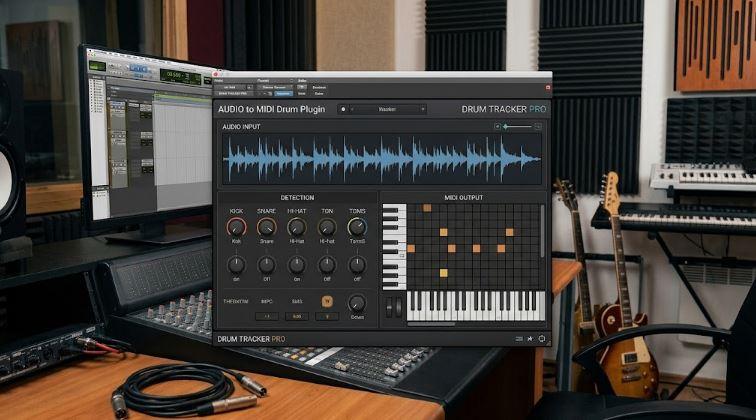
The Pick Pocket Manual explains that the Transients panel shows the waveform with every detected hit marked and colored by voice: kick, snare, or hat. Sensitivity can catch ghost notes or ignore bleed and rattle. Users can click a hit to cycle its voice if the detector misclassifies it, drag a hit to set its velocity, or delete and add notes inside the MIDI editor. Every edit feeds directly into audition and export.
That editing layer matters because drum recordings are messy. A rimshot may look like a hat. A ghost snare may sit below the detector threshold. A bleed-heavy loop may produce extra events. Pick Pocket gives producers correction tools rather than pretending detection is always perfect.
The result is practical. Producers can capture the groove quickly, then fix the few moments where the analysis needs human judgment.
Why Capture From A DAW Track Changes The Workflow
Pick Pocket’s capture-from-track feature makes it more useful than a drag-and-drop converter alone. The official product page says producers can capture audio straight off a DAW track, while automatic loop detection finds clean 2-, 4-, or 8-bar sections and cuts them click-free. The manual explains that the plugin records whatever passes through the channel it sits on, whether that is a drum bus, sampler channel, or a loop playing inside the session.
That matters because producers often hear a groove in context. A loop may already sit inside a beat. A rough demo may have a drum take with the right feel but the wrong sound. A vinyl-style loop may carry movement that the rest of the track needs. Instead of bouncing audio, trimming bars, importing files, and then converting, the producer can insert Pick Pocket on the source track and capture while the DAW plays.
This keeps the workflow musical. The producer can work inside the arrangement, capture the pocket, audition it against the song, and export MIDI onto a new drum-instrument track.
For RobSonic readers, that is the practical advantage. Pick Pocket reduces the distance between hearing a feel and using that feel.
How The Groove Editor Turns Feel Into A Controllable Parameter
The strongest part of Pick Pocket is not simply that it extracts MIDI. It lets producers scale and reshape feel after extraction. The manual describes a Pocket control where 0% quantizes the groove dead onto the grid, 100% preserves the original timing, and values above 100% exaggerate the push and drag. The Dynamics control does the same for velocity, flattening hits at 0%, preserving the source at 100%, and making accents more dramatic beyond that.
This makes the groove editable at a musical level. A producer can keep the drummer’s timing but reduce exaggerated dynamics. Another can keep the dynamics but tighten the timing. A third can push the pocket beyond the original loop for a more stylized bounce.
The Pocket lane also shows each hit’s deviation from the grid as a dot. Producers can drag dots to push hits ahead or pull them behind. That gives direct visual control over microtiming without forcing the user to stare at a piano roll and guess why the groove feels wrong.
This is why Pick Pocket can help producers learn. It turns feel into something visible and adjustable.
Why Ableton Groove Export Matters
Pick Pocket does not only export MIDI. It can also export Ableton .agr groove files. The official manual says the .agr export captures the feel alone, so producers can apply it to drums, bass, keys, or any clip inside Ableton Live’s groove pool.
That feature expands Pick Pocket beyond drum replacement. A producer can extract the pocket from a drum loop and apply that timing feel to a bassline. A keyboard stab can follow the same push and drag as the hats. A percussion layer can inherit the same swing. A synth sequence can breathe with the drummer’s timing instead of sitting rigidly on the grid.
This matters because groove often works across the whole rhythm section. A bass part that ignores the drummer’s pocket can feel disconnected even if the notes are correct. Ableton groove export gives producers a way to spread timing relationships across the arrangement without copying the original audio.
That also makes Pick Pocket useful as a feel analysis tool. Producers can ask, “What happens if the whole track follows this pocket?” instead of only asking, “Can I replace this drum loop?”
How Pre-Mapped MIDI Reduces Drum-Plugin Friction
Pick Pocket exports standard MIDI pre-mapped for major drum software. Yurt Rock lists Superior Drummer, EZdrummer, BFD3, Slate SSD5, Addictive Drums 2, Groove Agent for Cubase, and General MIDI. The manual says the mapping gets baked into the exported notes, so the MIDI lands on the correct pads without remapping.
That detail matters because drum-plugin mapping can ruin momentum. A producer may successfully extract MIDI, drag it into a drum instrument, and hear kicks triggering snares or hats landing on the wrong articulations. Then the session becomes a technical cleanup job.
Pre-mapped export keeps the workflow focused on feel. Choose the target map, drag the file into the right instrument, and audition the groove with a new kit. The producer can still edit notes afterward, but the first playback should land close enough to judge the pocket.
This connects naturally with RobSonic’s creative sampling and legal basics, because modern production often separates source, feel, tone, and final arrangement. Pick Pocket helps extract feel, but producers still need to use source material responsibly and understand what rights they have to the audio they analyze.
Why Yurt Rock’s Vault Integration Makes Sense
Pick Pocket fits Yurt Rock’s broader drum-loop ecosystem. The official page says the plugin includes built-in Vault browsing, and Vault members can extract grooves from any loop in the catalog instantly. It also says everyone gets starter grooves from Nate Smith, Clyde Stubblefield, Marcus Finnie, and Darren King. The Yurt Rock FAQ says the company’s loops are royalty-free for use in songs after purchase, and it identifies Yurt Rock as founded in 2021 by Ryan Gruss, formerly the founder and CEO of The Loop Loft, which Native Instruments acquired in 2018.
That background matters because Yurt Rock already sells drum feel. Its catalog centers on loops, samples, MIDI, multitracks, and performances by session players. Pick Pocket turns that library into something more flexible. A user can hear a drummer’s pocket, extract the timing, and drive a completely different kit.
This is also why Pick Pocket has a strong commercial logic. Yurt Rock is not only selling a converter. It is making its existing catalog more reusable. A loop no longer has to remain a loop. It can become groove DNA for another production.
For producers, this makes the Vault integration useful even if they do not keep the original audio in the final track.
Why “Stealing The Pocket” Needs A Responsible Reading
The phrase “steal the pocket” works as marketing because it sounds bold and immediate. Producers should still read it responsibly. Pick Pocket can analyze any drum recording, but that does not mean every use of every source is automatically safe. Extracting timing from a copyrighted commercial recording can raise legal and ethical questions, especially if the resulting work closely imitates a distinctive performance or relies on unlicensed material in a recognizable way.
The cleanest use cases are straightforward. Use your own drum recordings. Use loops and samples you licensed. Use royalty-free material under its terms. Use Pick Pocket to analyze your demos, your drummer’s takes, your purchased Yurt Rock loops, or audio you have the right to use. If a source comes from someone else’s record, treat it as a learning reference unless you know the rights situation.
This distinction matters for RobSonic’s audience because groove extraction sits near sampling culture. Producers often study records, lift inspiration, and build new feel from old references. Pick Pocket makes the process faster, but speed does not remove responsibility.
The safest creative move is to steal the lesson, not the protected recording.
How Layered Audition Helps Producers Hear The Transfer
Pick Pocket includes a useful audition method. The manual describes separate play buttons for the original loop and the extracted MIDI, plus a Layered mode that plays the MIDI kit in lockstep with the original. If the layered result sounds doubled, the pocket transferred.
That is a smart design choice because groove accuracy can be hard to judge visually. A piano roll may look close while the feel still sounds off. Layered audition lets producers use their ears. If the MIDI flamms against the original, a hit may need adjustment. If it doubles cleanly, the timing and velocity likely survived well enough.
The VU console also provides Loop, MIDI, and Master meters with faders, so producers can balance the original against the audition kit. The manual says the Tempo control can change audition playback while preserving pitch through the Signalsmith Stretch engine, and the plugin can sync audition playback to the DAW’s next bar line when the host transport runs.
These details make Pick Pocket feel like a DAW workflow tool, not only a conversion utility. It helps producers test feel in context before committing to export.
Why It Can Help Producers Escape Quantized Drum Programming
Quantized drum programming solves timing but often kills personality. A beat may hit perfectly, yet feel stiff. Producers then add swing, random timing, random velocity, ghost notes, or groove templates. Those techniques help, but they can sound generic if they do not come from a real performance.
Pick Pocket offers a different starting point. Instead of adding humanization randomly, it captures a specific pocket from a specific groove. That pocket contains relationships: how the kick sits against the snare, how hats pull against the grid, where ghost notes fall, and how accents shape the phrase.
A producer can then revoice that pocket with modern samples, acoustic kits, electronic drums, hybrid percussion, or custom one-shots. The sound can change completely while the timing personality remains.
This is especially useful for producers who program drums but admire real drummers. Pick Pocket can turn a groove into a study object. Export the MIDI, inspect the timing, compare it with the grid, and learn how the pocket works.
How Producers Can Use Pick Pocket In A Real Session
Pick Pocket works best when producers decide whether they want replacement, reinforcement, or groove transfer. Replacement means the original loop leaves the track and the extracted MIDI drives a new kit. Reinforcement means the extracted MIDI layers under the original to add punch, clarity, or sample support. Groove transfer means the timing feel gets exported as MIDI or an Ableton groove file and applied to other parts.
A practical workflow could look like this:
- Insert Pick Pocket on a drum loop, drum bus, sampler channel, or rough demo drum track.
- Capture the cleanest 2-, 4-, or 8-bar section, or drag in a licensed loop directly.
- Check the Transients view and correct any misclassified kick, snare, or hat hits.
- Use Layered audition to confirm that the extracted MIDI locks with the original groove.
- Adjust Pocket and Dynamics only after the raw transfer feels correct.
- Export standard MIDI to the target drum plugin, or export
.agrif the goal is Ableton groove transfer. - Mute the original loop when replacing it, or keep it quietly layered when the source audio adds character.
This workflow keeps the tool musical. The goal is not to extract every loop just because the plugin can. The goal is to capture a pocket that helps the track move.
What Producers Should Watch Before Buying
Pick Pocket looks simple from the outside, but producers should check a few practical details. Yurt Rock lists formats as VST3, AU, and standalone app, with AAX coming soon. The product page lists macOS 11 or later on Intel and Apple Silicon, Windows 10 or 11 at 64-bit, authorization through a Yurt Rock account login, no iLok or dongle, up to three activations, and offline operation after installation and activation.
KVR lists the current product version as 0.1.17, which suggests the plugin is still early in its release life. Producers should test the free tier with their own material before relying on it for a deadline session. The free download runs the analyzer and groove editor on starter grooves and user loops, while export requires activation, according to Yurt Rock’s product page and manual.
Users should also understand the current format situation. KVR’s release text mentions a browser version at vault.yurtrock.com/labs/pick-pocket, and the official manual says all three modes share the same interface: AU/VST3 inside a DAW, standalone, and browser inside The Vault. Pro Tools users should note that AAX support remains on the roadmap.
The best buyer is someone who works with drum loops, programmed drums, replacement kits, Ableton grooves, or real drummer demos and wants timing feel without manual reconstruction.
Why Pick Pocket Turns Human Feel Into Production Material
Yurt Rock Pick Pocket matters because it treats drum feel as portable production material. The plugin captures audio from a DAW track or file, detects and classifies hits, measures timing and velocity, displays swing and push/drag, lets producers correct transients, scales Pocket and Dynamics, auditions extracted MIDI against the original, and exports unquantized MIDI, Ableton groove files, or WAV audio.
For RobSonic readers, the practical value is clear. Pick Pocket can help producers replace a loop with their own drum sounds, reinforce a live groove with samples, apply a drummer’s feel to other instruments, study microtiming, and build more human drum programming without guessing. It makes pocket visible, editable, and exportable.
The strongest use is not careless copying. The strongest use is transformation. Start with material you have the right to use. Capture the feel. Revoice it. Edit it. Apply it to your arrangement. Let the human timing guide the track while the final sounds and production choices remain yours. That is how Pick Pocket turns a drum groove’s pocket from something hidden inside audio into something producers can shape on the timeline.