
OA-Labs Phosphor-1 v1.1 turns a free synth arpeggiator into a glitch sequencer because the update treats the arp section as a creative engine, not a background note repeater. A normal arpeggiator usually takes held notes and runs them up, down, random, or in a fixed order. Phosphor-1’s updated arpeggiator adds deeper step behavior, per-step octave motion, Trig Phase, hold/latch, groove preview, and per-step glitch actions that can jump, stutter, or skip. That shifts the feature from basic pattern playback into controlled rhythmic instability.
The official OA-Phosphor-1 page describes the free synth as “controllable instability,” available for Mac and Windows as VST3, plus AU on Mac. OA-Labs says version 1.1 adds Windows support, a deeper arpeggiator with Trig Phase, per-step octave and glitch, groove preview, hold/latch, preset import, MIDI sync, and MIDI Learn. The official OA-Phosphor-1 changelog lists version 1.1.0 on August 20, 2026, calling it the biggest update yet, with a deeper arpeggiator, preset import, 17 new presets, and a move to the permanent OA-Labs identity. KVR covered the update on August 23, 2026, noting that OA-Labs updated OA-Phosphor-1 to v1.1 with Windows VST3 support and a completely reworked arpeggiator.
For RobSonic readers, the important story is clear: a free virtual analog synth now offers a pattern system that can behave more like a glitch-aware sequencer than a conventional arp.
Why A Synth Arpeggiator Usually Feels Too Polite
A conventional arpeggiator helps producers move quickly. Hold a chord, choose a direction, set a rate, and the synth turns harmony into motion. That workflow works for basslines, plucks, leads, retro sequences, and quick sketches. It also gets predictable fast. Up, down, up/down, random, and chord-order arps can sound useful, but they rarely create the kind of unstable rhythmic behavior producers associate with modern glitch, IDM, experimental techno, or broken-electronic patterns.
A step sequencer gives producers more control, but it can also slow the session down. The user has to program pitch, velocity, gates, ties, rests, timing, and variation. That extra detail creates better patterns, but it can break the immediacy that makes an arpeggiator attractive in the first place.
Phosphor-1 v1.1 tries to bridge that gap. It keeps the directness of an arpeggiator while giving each step more personality. Per-step octave motion changes register. Glitch actions interrupt the phrase. Trig Phase changes when steps fire across cycles. Groove preview helps timing feel deliberate. Hold/latch turns the pattern into something a producer can leave running while shaping the synth.
That makes the arpeggiator less polite. It still begins from played notes, but it can now bend, break, and reorganize the phrase.
How The v1.1 Arpeggiator Changes The Instrument
OA-Labs says Phosphor-1 v1.1 brings new Trig Phase, per-step octave motion, per-step glitch, groove preview, hold/latch, and safer step editing. Those changes matter because the arpeggiator becomes the center of the synth’s movement. It no longer acts only as a convenience layer above the sound engine.
Trig Phase gives steps a cycle-based firing behavior. OA-Labs describes it as an Elektron-style A:B step-firing system with a PHASE control. That means a step does not have to fire every time the arpeggiator reaches it. It can appear on a specific cycle relationship, creating longer rhythmic structures from a short pattern. A four-step idea can start to feel like a 16-step or 32-step phrase when selected steps appear only on certain passes.
Per-step octave motion changes the pitch shape without forcing the producer to change the held notes. A chord can generate a bass movement, upper-register flash, or shifting melodic contour. The glitch actions add another layer. Jump, stutter, and skip can interrupt the expected flow, creating hiccups, repeats, breaks, and rhythmic misdirection.
Taken together, those features push the arp toward sequencer behavior. The source remains playable, but the pattern carries its own logic.
Why Glitch Works Better When It Has A Leash
Phosphor-1’s whole identity depends on controlled instability. The official site says every source of chaos has a leash. That sentence matters because glitch behavior can easily become random noise. Producers do not need a plugin that simply breaks the rhythm at unpredictable moments. They need one that creates instability they can steer.
The v1.1 arpeggiator fits that philosophy. A per-step glitch effect gives the producer a place to put disruption. Jump can move the phrase somewhere unexpected. Stutter can repeat a moment. Skip can create a hole. Those actions become most useful when they happen on chosen steps rather than everywhere.
A producer might let a bassline run clean for most of a bar, then trigger a stutter only on the last step. Another patch might skip a step every other cycle through Trig Phase. A lead arp might jump registers with octave motion while the groove preview keeps timing clear. The instability stays musical because the producer decides where the fracture belongs.
This is why Phosphor-1 v1.1 feels different from a chaos-only tool. It gives glitch a grid, a pattern, and a performance role.
How Groove Preview Helps The Arp Feel Human
Groove can decide whether a synthetic pattern feels alive. OA-Labs says version 1.1 adds a groove preview that shows a groove’s real per-step timing, and that choosing Custom unlocks the lane so users can refine timing from a template instead of starting blank. That feature matters because groove often becomes hard to understand visually. A swing knob may change timing, but it does not always show how individual steps move.
A groove preview makes timing visible. Producers can see how the steps shift before they commit to a pattern. The custom lane then lets them start from an existing feel and adjust it, which works faster than drawing every microtiming move from zero.
This helps the arpeggiator behave more like a sequencer. A normal arp rate can feel stiff. Groove makes the pattern lean, drag, rush, or breathe. When groove combines with glitch actions, octave motion, and Trig Phase, the arp can create a phrase that feels less like a machine repeating a chord and more like a pattern system with timing personality.
For RobSonic readers, this is useful because electronic rhythm rarely depends on notes alone. Timing, hesitation, and displacement often create the hook.
Why Windows Support Changes The Audience
Phosphor-1 started as a Mac release. Bedroom Producers Blog covered the initial August 8, 2026 release as a free unstable analog-style synth for macOS, noting its two oscillators, dedicated sub, cross/ring/hard-sync blending, morphing multimode filter, waveshaper, dual LFOs, envelopes, unison, glide, oversampling, preset browser, and generative arpeggiator. The official v1.1 page now lists Mac and Windows support, with VST3 on both platforms and AU on Mac.
That matters because free synth culture depends on access. A Mac-only free instrument can build attention, but Windows support greatly expands the user base. Many bedroom producers, electronic musicians, and plugin collectors work on Windows systems. Phosphor-1 v1.1 turns the plugin from a Mac-only curiosity into a cross-platform free synth.
The support page confirms the practical requirements: macOS or Windows, a host that loads AU on Mac or VST3 plugins, about 18 MB on Mac, and about 5 MB on Windows. That small footprint also matters. Phosphor-1 is not a massive library or subscription ecosystem. It is a lightweight synth that producers can download, test, and keep.
For RobSonic’s audience, that makes the update more relevant. A creative arpeggiator becomes more important when more producers can actually use it.
How The Synth Engine Supports The Glitch Sequencer Idea
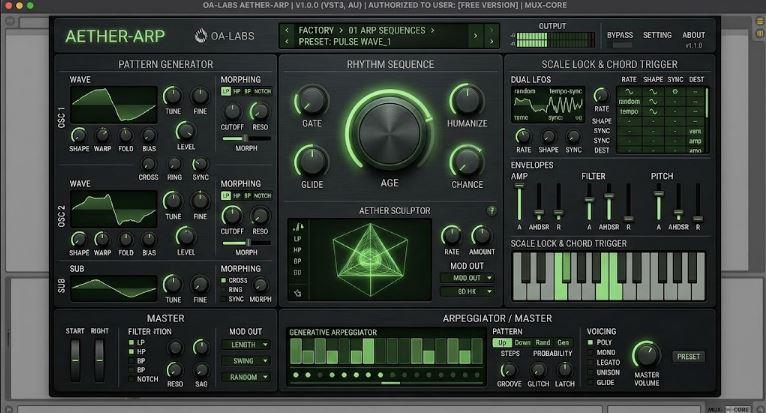
The updated arpeggiator would not matter as much if the synth engine sounded flat. Phosphor-1 gives the pattern system a sound source designed around movement, drift, and deformation. The official feature list includes two oscillators plus a dedicated sub, cross, ring and hard-sync blend, dual random and tempo-synced LFOs, amp/filter/pitch envelopes, a morphing multimode filter, waveshaper controls for warp, curve, fold and bias, up to 4x oversampling, drift, jitter, wander and sag, chaos rate and amount, poly/mono/legato modes, unison with spread and phase, and glide.
That feature set matters because glitch sequencers need sound engines that can react. A jump, stutter, or skip feels more dramatic when the tone has unstable edges. A per-step octave jump sounds stronger when the oscillator blend includes sub weight, sync bite, or ring-mod grit. Groove timing becomes more expressive when filter movement and envelope shape respond tightly.
The AGE engine gives the whole instrument a worn character. The Lorenz chaos modulation adds deterministic motion that does not quite repeat. The morphing filter moves across filter types instead of staying in one static response. The waveshaper can add curve, fold, bias, and harder edge.
These features make Phosphor-1 a good host for a glitch-aware arp. The pattern breaks; the sound engine frays with it.
Why “Controlled Instability” Fits Modern Electronic Production
Modern electronic producers often want instability, but not total collapse. A perfect digital synth can feel too clean. A fully random system can feel unusable. The sweet spot lies between those extremes: drift that adds character, jitter that adds movement, groove that shifts timing, and glitch that interrupts predictability without destroying the track.
Phosphor-1’s identity sits in that middle zone. OA-Labs calls the synth “unpredictable by design, built to be played, not fought.” Bedroom Producers Blog described the sound as useful for warped-cassette-style textures and unstable analog-style movement. KVR emphasized that the update keeps the core synth while expanding the arpeggiator and Windows support.
That combination fits a current production taste. Producers use instability to make digital tracks feel less rigid. They want aged pads, off-center basses, broken arps, warped keys, and sequences that sound like they might fall apart but never fully do. Phosphor-1 v1.1 gives that aesthetic a free entry point.
The arpeggiator update strengthens the concept because instability now lives inside the pattern, not only the oscillator or filter.
How Producers Can Use Trig Phase Musically
Trig Phase may sound technical, but its musical role is simple: it lets steps appear on selected cycles instead of every pass. That creates longer forms inside short patterns. A producer can keep the core arp tight while adding occasional notes, glitches, octave jumps, or gaps.
A bass pattern can use Trig Phase to create a fill every fourth repetition. A lead can trigger a stutter every second pass. A pad arp can skip certain steps on alternating cycles, creating a shifting harmonic rhythm. A glitch line can place jump actions on steps that only fire after several repeats, making the pattern feel like it evolves without a separate automation lane.
This matters because producers often create variation by duplicating MIDI clips and editing the last bar. Trig Phase puts some of that phrase-level variation inside the instrument. The performer can hold the same notes, but the arp can reveal different details across cycles.
That is why the arpeggiator starts to feel like a sequencer. It gives producers a way to design events over time, not just note order inside one pass.
Why Hold And Latch Make The Arp More Performable
Hold and latch features help turn Phosphor-1 into a performance tool. A producer can trigger a chord, let the arp continue, and then use both hands to adjust AGE, chaos, filter morphing, waveshaping, unison, glide, or MIDI-mapped parameters. That matters because the best glitch sequences often come from live tweaking.
Without hold or latch, a producer must keep notes pressed while trying to move controls. That limits performance. With hold/latch, the pattern becomes a running system. The user can push drift, adjust filter motion, change groove, move waveshaping, or record automation while the arp keeps playing.
This works especially well with MIDI Learn, which returned in version 1.1 according to the official changelog. OA-Labs says MIDI Learn now includes a visual indicator on mapped controls and a simple way to clear mappings. Producers can map hardware knobs or faders to key parameters, then treat Phosphor-1 like a small performance synth.
The arp supplies movement. The hands shape the instability around it.
How Preset Import And New Presets Support A Community Workflow
Version 1.1 adds preset import and sharing, with drag-in XML presets, rescan from disk, and reveal-in-file-browser options. The official changelog also lists 17 new factory presets across arp, keys, lead, pad, and FX categories. These updates matter because a free synth grows stronger when users can share sounds easily.
Preset sharing helps a synth develop a culture. One producer may build broken arps. Another may focus on aged pads. Another may create noisy FX, unstable basses, or warped keys. If presets move easily between users, the instrument can grow beyond the factory bank.
This matters more for Phosphor-1 because the arp itself has become more detailed. Sharing a preset no longer means sharing only oscillator, filter, envelope, and modulation settings. It can also mean sharing a groove, glitch pattern, Trig Phase behavior, octave movement, and performance-ready instability setup.
That makes each preset closer to a mini-sequence. A strong arp preset can teach users how the new system works, then invite them to modify it.
Why Producers Should Treat It As A Sequencer, Not Just An Arp
The best way to use Phosphor-1 v1.1 is to stop thinking of the arpeggiator as a chord repeater. Treat it like a compact glitch sequencer embedded inside the synth. The held notes provide source material. The step controls create structure. Trig Phase creates cycle-based variation. Octave motion creates melodic contour. Glitch actions create breaks. Groove shapes timing. Hold/latch supports performance.
A practical workflow could look like this:
- Start with a simple two-note or three-note chord instead of a dense voicing.
- Program octave motion first so the pattern has a clear contour.
- Add glitch actions only to one or two steps so the rhythm keeps its identity.
- Use Trig Phase for fills or occasional disruptions rather than constant chaos.
- Shape AGE, chaos, filter morphing, and waveshaping while the arp runs.
- Record several audio or MIDI passes and keep the version with the best accidents.
This keeps the system musical. A glitch sequencer becomes useful when it balances repetition and surprise. Too much repetition becomes dull. Too much surprise becomes noise. Phosphor-1’s update gives producers the controls needed to stay between those extremes.
What Producers Should Watch Before Downloading
Phosphor-1 is free, but producers should still read the support notes before installing. OA-Labs says the Mac installer places AU and VST3 files into standard plugin folders, while the Windows installer places VST3 into the standard VST3 folder. The support page also notes that Windows SmartScreen may warn about an unrecognized app because OA-Labs is a new publisher, and the official homepage says the publisher appears as Form and Function Studio, the registered business behind OA-Labs.
Users upgrading from older builds should pay attention to plugin IDs. The changelog says Phosphor-1 now uses OA-Labs plugin IDs, so an instance saved in an older project will not relink on its own. Users need to reinsert Phosphor-1 and reload their preset, while older presets remain kept.
That detail matters for anyone who already used the first build in songs. A free plugin still belongs in real projects, and plugin ID changes can affect recall. Producers should finish or bounce important older sessions before updating, or save presets and reinsert carefully.
The plugin also does not currently support AAX, according to the official page. Pro Tools users will need to wait or join the AAX waitlist.
How Phosphor-1 Fits RobSonic Production Workflows
Phosphor-1 v1.1 fits RobSonic’s music-production angle because it sits at the intersection of free tools, sound design, sequencing, and performance. It does not try to compete with giant commercial synths. It focuses on one strong identity: a free virtual analog synth that makes instability playable.
That makes it useful for several production roles. A producer can use it for broken arps under drums, aging pads, unstable leads, gritty bass sequences, noisy FX, warped keys, and glitch fills. The updated arp can create rhythmic movement before the producer adds external effects. The synth engine can then add drift, chaos, filter morphing, waveshaping, unison, and glide.
This connects naturally with RobSonic’s bassline synthesis guide, because basslines often become more interesting when pitch movement, timing, filter behavior, glide, distortion, and controlled variation work together. Phosphor-1 gives producers a free way to explore those ideas inside one instrument.
It also suits resampling. Print an unstable arp, cut the best bar, reverse a glitch moment, layer it under drums, or process it through delay and reverb. The arpeggiator can generate raw material as much as finished parts.
Why OA-Labs Phosphor-1 v1.1 Matters
OA-Labs Phosphor-1 v1.1 matters because it turns a free virtual analog synth into a more serious pattern instrument. The Windows release expands access. The refreshed arpeggiator adds real musical depth. Trig Phase creates longer phrase behavior from short patterns. Per-step octave motion gives arps contour. Jump, stutter, and skip create glitch without abandoning control. Groove preview makes timing visible. Hold/latch makes performance easier. MIDI Learn brings hardware control back into the workflow.
For RobSonic readers, the practical value is direct. Phosphor-1 v1.1 can generate unstable arps, broken basslines, warped keys, flickering leads, and glitchy pattern material without requiring a paid synth or a separate sequencer plugin. It gives producers a small, free instrument that encourages motion, accidents, and hands-on control.
That is why the update feels larger than a version number. A basic arp repeats notes. A strong sequencer creates behavior. Phosphor-1 v1.1 pushes its arpeggiator toward that second category, turning a free synth feature into a glitch sequencer built for producers who want rhythm to bend, fracture, and keep moving.