
Sample folders are efficient archives but awkward instruments. A producer may own thousands of melodic one-shots and loops, yet finding a useful sound still means opening directories, reading filenames, auditioning files, and remembering where the best material was stored.
Sample Roll’s CRTE replaces that folder hierarchy with a playable map.
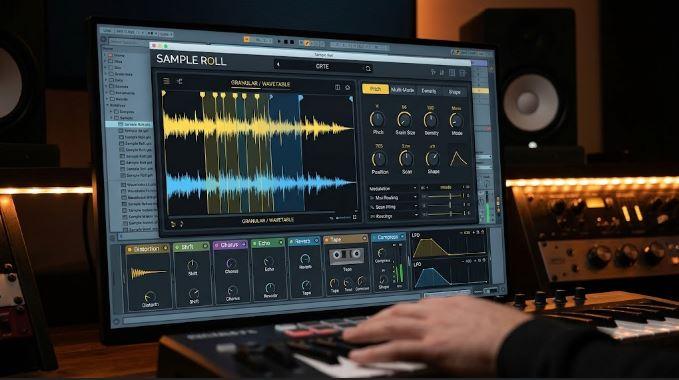
Launched on November 3, 2026, CRTE analyzes a chosen sample collection, removes material it identifies as drums, noise, or complete mixes, and places the remaining melodic sounds on a grid. Similar samples sit near one another. The producer then drags circles across that map, turning whatever falls beneath them into a granular pool that can be performed from a MIDI keyboard.
CRTE is not merely organizing a library more attractively. It changes browsing into navigation and turns the selected region into one evolving instrument.
CRTE Begins By Listening To The Folder
A conventional sample browser assumes its filenames and tags contain useful information.
CRTE analyzes the audio itself.
The official CRTE product page describes a four-stage process: listen, map, circle, and play. The software first examines every compatible file in the selected folder. Material classified as drums, noise, or a full mix is excluded from the melodic map.
What remains is arranged as colored squares, with sonically related files placed near one another.
That structure solves a common library problem. Two useful sounds may live in unrelated folders because they came from different sample packs, creators, or recording sessions. CRTE can place them together when their audio characteristics are similar.
The file system stops determining how sounds are discovered.
Their sonic relationship becomes the organizing principle.
The Map Replaces Search With Movement
Once analysis is complete, producers can click any square to audition the corresponding sample.
The full map provides a broad view of the library, but the instrument does not play every square simultaneously. A draggable circle determines which samples enter the active pool.
Move the circle and the pool changes.
That makes browsing continuous rather than transactional.
A traditional browser asks the producer to choose one file, load it, reject it, and repeat. CRTE allows gradual movement through related material. Nearby positions produce pools with overlapping characteristics, while a large move can reveal a very different part of the collection.
The map therefore behaves like a timbral surface.
Warm, soft, metallic, vocal-like, plucked, sustained, and other characteristics can form regions even when the original folders never described them consistently.
Three Circles Can Blend Distant Parts Of The Library
CRTE supports as many as three circles at once.
Each circle selects another part of the map, and all selected samples join the same playback pool. That means the instrument is not limited to one tightly grouped family of sounds.
A producer might place one circle over soft keyboard-like material and another over glassy textures. A third could introduce vocal or string-like samples.
The three regions then behave as one instrument.
This is more flexible than loading three presets into separate samplers because the boundaries remain movable. Shift one circle and the blend changes without rebuilding the patch.
Circles can also be animated.
BREATHE expands and contracts a circle by as much as 60 percent in synchronization with the host, across rates from half a bar to eight bars. BOUNCE sends it moving around the map, while REC records a manually drawn path and loops that motion over whole beats or bars.
The sample selection itself becomes modulatable.
Held Notes Can Travel Through The Map
CRTE keeps movement connected to performance.
When Follow behavior is active, moving a circle while holding a note changes which sounds contribute to that sustained note. The producer does not need to release the key and retrigger the instrument after every movement.
A pad can begin in one part of the library and gradually migrate into another.
A sustained note might start with muted organic samples, pass through brighter material, and settle in a synthetic region.
That creates timbral motion without relying solely on filters or wavetable scanning.
The instrument is changing its source pool while the note continues.
Keep Body helps preserve the tonal character of samples as they are played across the keyboard. CRTE repitches grains to the MIDI note while trying to prevent every sample from losing its original identity at wider keyboard intervals.
Ten Grain Types Interpret The Same Pool Differently
Selecting a circle does not determine one fixed playback behavior.
CRTE includes 10 grain types: Blend, Swarm, Walk, Weave, Split, Drift, Keys, Botanica, Play, and Chop. Each interprets the active pool differently.
Blend emphasizes combined granular playback.
Swarm creates denser motion.
Chop slices material in relation to tempo.
Keys approaches the samples more like a playable keyboard instrument.
Botanica selects one sample for each note and mutates it with processes such as reverse, octave movement, swelling, stuttering, glassy coloration, or vowel-like treatment.
The same circle can therefore generate very different instruments without moving to another part of the map.
A central CHARACTER control changes meaning according to the chosen grain type. This keeps the interface manageable while allowing each engine to expose its most relevant behavior.
The Selected Samples Can Become Wavetables
CRTE’s SYNTH section extends the map beyond granular playback.
The software can build a wave field from the samples beneath the active circle, using as many as eight lanes with 32 frames in each lane. A movable puck travels through that field, creating another path through the selected material.
The wavetable layer can be blended beneath or beside the grains.
This creates a second interpretation of the same map region.
The granular engine extracts fragments from selected recordings. The wavetable section turns those sources into evolving oscillator material.
CRTE also includes 18 factory wavetables and allows user-created fields to be saved.
The connection between map and wavetable matters more than the raw number of tables. Move the circle to another region and the source material available to the synth changes too.
A sample library becomes both the preset collection and the oscillator-building material.
A Vocoder Lets The Library Speak
CRTE includes a 24-band vocoder spanning approximately 100 Hz to 8 kHz.
Microphone input provides the articulating signal, while the granular and wavetable layers supply the carrier material. Spoken or sung phrases can therefore emerge through the active sample pool.
CRISP restores detail associated with consonants such as s, t, sh, and f. FORMANT moves perceived vocal character across a range of plus or minus 13 semitones.
This creates another way to navigate the library.
A selected region may work well as a pad when played from a keyboard but produce a completely different identity when shaped by speech.
The map is not only a place from which notes are drawn. It can become the timbral vocabulary of a vocal processor.
Chord Keys Turn Sample Pools Into Progressions
CRTE provides nine white keys for complete chords.
Users can capture their own chord onto an armed key or begin with 14 factory sets. Voicing options include close, open, and drop-2 structures, alongside inversion and octave controls.
Strum can spread the notes of a chord across as much as 200 milliseconds.
The chord system is useful because granular pools do not always behave like familiar keyboard patches. Triggering a complete voicing from one key makes it easier to evaluate whether the current map region works as harmonic material.
An arpeggiator extends those chords through eight playback modes.
PHRASE mode is the most distinctive because it can use melodic information found in a source sample. Sixteen rhythm steps, rests, accents, swing, gate, and a four-octave range provide further control.
CHANGE NOTES can alter the sequence in key after a chosen number of bars, preventing a held progression from remaining identical indefinitely.
CRTE Ships With Material Before The User Adds A Folder
Sample Roll includes 28 multisampled instruments and more than 500 one-shots.
That factory material appears on the map when CRTE opens, giving users a working instrument before they import their own collections. Instrument categories such as Bass, Keys, Pluck, Pad, Lead, Bells, and Texture help favor samples appropriate to a particular role.
The November 3 CRTE launch report confirms the map analysis, three-circle workflow, grain engines, wavetable construction, vocoder, chord system, and arpeggiator.
CRTE version 1.0 runs as VST3 on Windows and macOS, Audio Unit on macOS, and a standalone application. Sample Roll currently lists a $59 introductory price against a regular price of $120, with a seven-day trial and one-time online activation.
The Effects Section Keeps The Map Inside One Instrument
Seven reorderable effects are included: Distortion, Shift, Chorus, Echo, Reverb, Tape, and Compress.
Distortion offers seven characters, including Tube, Fold, Crush, SP-12, and Radio. Tape can capture one, two, or four bars of its own wear, while Compress applies three-band processing.
Two LFOs can be dragged directly onto controls, supporting as many as 12 modulation routes.
These processors let a selected pool become a finished patch without immediately requiring a large external chain. Producers can still continue processing inside the DAW.
RobSonic’s creative effects-chain guide explains why processor order changes the identity of source material. CRTE brings that principle inside the sample-map workflow: the selected sounds provide the raw identity, while effect order determines how that identity reaches the mix.
CRTE Deliberately Does Not Map Everything
CRTE’s map is designed around melodic material.
Its analysis intentionally excludes files classified as drums, noise, or complete mixes. That focus keeps the navigable space centered on sounds that can be repitched and played harmonically.
The same design can exclude material a sound designer might have wanted to explore.
A noisy field recording, hybrid drum texture, or full-mix fragment may still be useful inside a conventional sampler even when CRTE decides it does not belong on the melodic map.
The classification system should therefore be treated as creative organization rather than a universal judgment about which files have musical value.
CRTE does not replace every sample browser or slicer.
It creates one instrument from the portion of a library suited to its pitch-based granular workflow.
Why The Folder Starts Feeling Like One Instrument
CRTE changes the unit of sample selection.
A normal browser treats each file as an individual decision.
CRTE analyzes the collection, arranges similar sounds together, and lets the musician select regions rather than isolated filenames.
Circles define the active pool.
Movement changes the pool during held notes.
Grain types reinterpret it.
The wavetable engine rebuilds it.
The vocoder makes it speak.
Chord keys and the arpeggiator turn it into harmonic material.
That is why CRTE feels less like a library manager with playback attached and more like an instrument whose raw material happens to be an entire sample folder.
The producer is no longer searching for one perfect file.
They are navigating relationships between many files and performing the region where those relationships become musically useful.